Call Flow Script: Set Office hours via Dial codes

IliasL_3CX

Staff member
Joined
Jun 2, 2014
Messages
147
Reaction score
118

Set PBX departments to in-office, out-of-office, break, or holiday with dial codes.​

This script enforces specific hours for all departments in the PBX, replacing the deprecated office/out-of-office dial codes in Version 20. When you dial the assigned code, it sets all departments to in-office, out-of-office, break time, or holi...
Continue reading the Original Blog Post.
 
Thank you for the official post !
For information, by default, the script force (the out-of-office for example) for only 1 day but you can modify and increase the number for 999 (didn't try more but look enough), could be useful for week-end or holiday that can be larger than just one day.
 
I hope that the use of scripts will soon be possible on hosted instances.
 
I hope that the use of scripts will soon be possible on hosted instances.

I just noticed that in Build 20.0.4.487, CFD and scripts are now available on a hosted server, it's perfect !
 
If we modify the scripts for functionality are the returned to default when 3CX updates are installed ?

thanks
 
If we modify the scripts for functionality are the returned to default when 3CX updates are installed ?

thanks
 
Is there a way to hard set which dept we can change this for and not "all"? I see where the script tries to GetAll(), but not sure how to tweak this for just a single dept or several depts.

//for all departments
ps.GetAll().Extract(x=>x.AllowCallService)
.Select(x=>
{
try
{
 
If we modify the scripts for functionality are the returned to default when 3CX updates are installed ?

thanks
No they just serve as templates and then you can edit them....
 
Hi all,

I think it is a good update! Two questions:

is it possible to see somewhere in the PBX admin console that it was switched to out of office? This will help with searching for errors e.g. when user by accident switched the PBX to out of office.

Is there a way to set a BLF for the reception extention so the reception can see the status of the PBX?

Best regards,
Ronald
 
Hi all,

I think it is a good update! Two questions:

is it possible to see somewhere in the PBX admin console that it was switched to out of office? This will help with searching for errors e.g. when user by accident switched the PBX to out of office.

Is there a way to set a BLF for the reception extention so the reception can see the status of the PBX?

Best regards,
Ronald
Yes, you can check it on the webclient and you will see the time remaining.

https://www.3cx.com/docs/manual/office-hours/#h.ogkdaoyj802d
 
Thank you for the official post !
For information, by default, the script force (the out-of-office for example) for only 1 day but you can modify and increase the number for 999 (didn't try more but look enough), could be useful for week-end or holiday that can be larger than just one day.
Hi,
Have been using this for one of my customers, and I thought it was working ok. Tested it a couple of times for them.
Only just figured out that it only sets it until midnight.
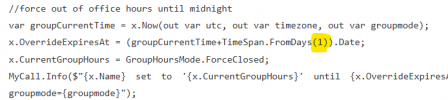
You say I can modify it to make it longer. Just to make sure I'm editing the right bit of the script, am I changing the 1 in the screenshot to a larger number?

1734484714558.png

Thanks,
Marc
 
Hi,
Have been using this for one of my customers, and I thought it was working ok. Tested it a couple of times for them.
Only just figured out that it only sets it until midnight.
You say I can modify it to make it longer. Just to make sure I'm editing the right bit of the script, am I changing the 1 in the screenshot to a larger number?

View attachment 45688

Thanks,
Marc
Yes, exactly :) I change it to "999" without a problem.
 
is it possible to have the office hours scripts not reset at midnight. I’d like it to no reset and stay until the next code is entered.
 
is it possible to have the office hours scripts not reset at midnight. I’d like it to no reset and stay until the next code is entered.
 
  • Like
Reactions: jclark
Thanks so much, greatly appreciate it!
 
  • Like
Reactions: NicholasP_3CX
Anyone find a way to set this per department and not for all departments? Even if we choose a deparment when we load the script whe we engage it ends up applying to all departements.
 
Has anybody found a way to have a BLF (or something else) show the status on the handsets? This is a glaring missing feature, as there's nothing to indicate the status of the system other than logging into the web interface. My customer does not use the web interface... Thanks!
 
Has anybody found a way to have a BLF (or something else) show the status on the handsets? This is a glaring missing feature, as there's nothing to indicate the status of the system other than logging into the web interface. My customer does not use the web interface... Thanks!
Nothing you can do. Only the Webclient shows this.
 
Anyone find a way to set this per department and not for all departments? Even if we choose a deparment when we load the script whe we engage it ends up applying to all departements.
Is it possible with 3CX V20 Update 5 Final to modify this script so that the scope is limited to the main-department of the caller?
 

Members Online Now

Forum statistics

Threads
111,834
Messages
589,287
Members
164,662
Latest member
DejanMDS