Patton and v20

Status
Not open for further replies.

biomas

Silver Partner
Advanced Certified
Joined
Mar 1, 2013
Messages
27
Reaction score
6
Hello everyone,
I have a working Patton that was imported during the migration from v18 to v20 and has been working correctly since.
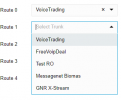
I had to change an outbound rule remove the Patton, now I have to add it back but it does not appear in the drop down box at all (it's the only trunk missing).
How should I proceed?
Thank you!
Lorenzo
 
Hi Lorenzo.
You no longer have a template as it is not supported from the 3CX end, and you will need to use a generic trunk to set up.
 
Hi Oleg, thank you for your reply.
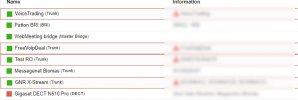
Maybe I wasn't clear, I'll try to explain better: I don't think I need the template, the Patton is already there and "working" (see trunks.jpg taken from "Voice & Chat" menu), I just need to change an existing outbound rule and add it, but the drop down list does not contain the Patton entry (see outbound-rule.jpg, taken from "Outbound rules" menu)
Lorenzo
 

Attachments

  • outbound-rule.png
    outbound-rule.png
    4 KB · Views: 40
  • trunks.jpg
    trunks.jpg
    63.1 KB · Views: 40
I may have found a workaround, I noticed that if I create a new trunk (manually this time, since the templates are not there anymore) I can then use it in the outbound rule editor.
 
Thank you for the feedback and glad you have found a workaround there.
 
A few days passed, I tried to follow my workaround but got stuck again. I did not have the password for the Patton/trunk so I had to start from scratch.
  1. I used a v18 instance to create the configuration file for a Patton (as we all used to do in the v18 days)
  2. I tweaked the configuration file with the correct IP for my v20 instance
  3. I loaded the configuration on the Patton
  4. I created a trunk in the v20 instance for the Patton: the trunk goes green in the web UI
Now, the problem: I can receive calls on this trunk, but I cannot place any.
The error in the log is:
Call or Registration to xxxxxx@(Ln.10001@Patton) has failed. sip:10001@xxxxxx:5060 replied: Request Timeout (408)
 
You're probably going to need to modify the Patton unit 'by hand'. While the Patton units do have a GUI interface, personally I think it's very difficult to use. And none of the Patton factory techs use it - they just modify the config files with a text editor. If you contact Patton, they'll probably help you.
 
  • Like
Reactions: Guillaume Bourgeois
Status
Not open for further replies.

Latest Posts

Members Online Now

Forum statistics

Threads
111,831
Messages
589,276
Members
164,660
Latest member
RJenkinsROCK