Provisioning issue since v18 update 8

Status
Not open for further replies.

CraigRy

Premier Customer
Basic Certified
Joined
Oct 16, 2023
Messages
5
Reaction score
3
2 Android users now report issue when they scan the QR Code. See attached. We have tried WiFi and Cellular connection.

Previously users connected ok. We had to reinstall 3CX Server software recently due to our license expiring during the certificate issue. When it reinstalled it changed the ports to 5000/5001. I assumed it would install using the same ports when restoring from backup, I guess not. I ran with it to minimize downtime.

I have updated my hardware firewall rules from 80/443 to 5000/5001. Tried turning off Windows Firewall.
Also, iPhone users can scan the same QR code the other user is trying and connect without issue.

Any ideas what to look for?
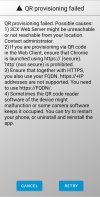
 

Attachments

  • Screenshot_20231016_085045_3CX.jpg
    Screenshot_20231016_085045_3CX.jpg
    691 KB · Views: 15
Try to scan the code with Android's device camera to see if it can be open in the browser.
 
Ok one of them was a false alarm. They were still scanning the QR code attachment from March, even though we sent a new Welcome email and said to scan the QR code in the webclient. They thought it would be easier.

The other one, a Note 9, gets the error still when scanning from the 3cx App. I even sent the QR code from the Management console just in case. I see the traffic in my Firewall when they scan from their camera it just spins.
 
Just for your interest Reinstalling the pbx it's the only way to change the used ports, so Yes restoring a backup doesn't link to the previous ports that were in use.
As default settings Debian PBX use natively 443 while Windows PBX use 5000/5001
 
Hi CraigRy,
Running into the same issue. New Pixel Phone 8. Upgraded from Pixel 4XL.
App was already installed. Tried to connect with QR code from Web App on my computer received the error.
Uninstall and install App. Tried Web app again. Logged into web client. Tried management console QR. Restarted phone. Tried reading code from old Pixel 4XL which was working and returns the error. All attempts return the same error message that you listed. Confirmed https when using web client. Already have split dns configured so 3cx url works internally.
I am unclear on Vali's advice to use the "device camera"
Thanks,
 
Thanks Steve.
I put the QR code in the phone camera and it displayed the link to download the provision code:
https://xxxxxxxx.yy.3cx.us:5001/P/xxxxxxxxxxxxxxx/yyyyyyyyyyyyy
(Actual numbers changed to protect the innocent)

Clicked on the link that showed in the camera app, and the Chrome browser returned the error:
The site can't be reached.
xxxxxxx.tx.3cx.us refused to connect.
Try:
Checking the connection

ERR_CONNECTION_REFUSED

I copied the link into keep notes and opened keep notes up on my computer.
Clicking on the link on my computer downloaded the xml config file, and the config looks correct.

Turned off my WiFi and then connected to my Google Fi account.
(I am cheap and have pay for data as you use it. I use data when I need to but otherwise, I always get WiFi.)

With WiFi off and Google Fi Data on, I was able to paste the link from the camera into Chrome and it worked.
I then tried to scan the QR code with the 3CX app and it worked.

Not sure why my WiFi did not work but I will troubleshoot that when I can.

Craig I do not know if turned off WiFi when you tried the cellular connection but that worked for me.
Thanks Vali for the test to run and thanks to Steve for explaining it.
 
  • Like
Reactions: Vali_3CX
@VictorYourITGroup
Now that your client has provisioned and working OK on Google Fi, switch back to your WiFi, launch the app and check if your status is green (top-right square). If not, then on your device open a browser and search for Whats my IP to get your internet IP. After that, from a desktop browser, open PBX Management Console dashboard and from there open the blacklisted list and see if your device IP is there - if yes, remove it or whitelist it.
 
Last edited:
No local IP's in my blacklist. WiFi and Cellular both did not work. Given up a bit as I have not had a lot of time to work on this.
 
Can revive this conversation, I am having a pixel 8 that will not provision. Same as above. Camera will not work.
 
@Egoes3 could you please provide the following:
Pbx version
Android OS Version
Android Brand
3CX Android client version
 
Status
Not open for further replies.

Members Online Now

Forum statistics

Threads
111,831
Messages
589,277
Members
164,660
Latest member
RJenkinsROCK