Solved Provisioning Of Yealink W60B

Status
Not open for further replies.
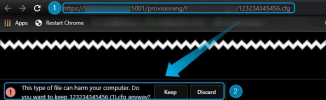
Sorry if I'm repeating myself but I realized I may have not been 100% clear. I am not referring to the device's GUI via the web browser but actually copying the link in the browser(Google Chrome, etc) directly such as:
1635773475943.png

You should be able to copy that link in a browser and it will download the config for the dect device. If it does not it may mean that you cannot reach the server or that the config cannot be downloaded. What error do you get when you do this?
 
  • Like
Reactions: Evolute IT
Thanks ChrisC - on chrome it has downloaded the config file, no errors.
 
Thanks ChrisC - on chrome it has downloaded the config file, no errors.
Well in that case we know that the link works and provided that you tested it from the same location the DECT is at we know that the DECT should be able to reach the configuration file.

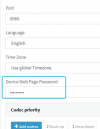
The question now is, is it provisioning at all. You could try changing the device admin password from the Management Console DECT settings page and then try and provision it again:
1635774937779.png

Give it a couple of minutes and then check If you can still access the device using the old password. If yes, it means that it did not provision. If that's the case, please let us know what version of 3CX you running, if you're using a custom FQDN or a 3CX one and if you see any updates available in the Management Console >> Updates section.
 
Well in that case we know that the link works and provided that you tested it from the same location the DECT is at we know that the DECT should be able to reach the configuration file.

The question now is, is it provisioning at all. You could try changing the device admin password from the Management Console DECT settings page and then try and provision it again:
View attachment 25574

Give it a couple of minutes and then check If you can still access the device using the old password. If yes, it means that it did not provision. If that's the case, please let us know what version of 3CX you running, if you're using a custom FQDN or a 3CX one and if you see any updates available in the Management Console >> Updates section.
I changed the device web password, then provisioned it again. Left it a good 10mins and tried logging in with the old password, and i could get into the W60B, so the provisioning didn't work. 3CX is hosted in AWS lightsail, running version 18.0 update 1 - build 237, and i'm using a 3CX FQDN, no updates available either.
 
Could you please PM me the 3CX FQDN and the first 8 characters of the License Key just so that I may run a few tests on our end?
 
  • Like
Reactions: The Chief
As per our PM conversation, @The Chief has confirmed that the issue was resolved after the FQDN's certificate got renewed eliminating an expired root certificate that was the cause of the issue.
 
Status
Not open for further replies.

Members Online Now

No members online now.

Forum statistics

Threads
111,831
Messages
589,277
Members
164,660
Latest member
RJenkinsROCK