Solved QR Provisioning failed! mobile app

Status
Not open for further replies.

Sajeesh

Free User
Joined
Jan 13, 2024
Messages
2
Reaction score
0
Hello,

I hope this message finds you well. I am currently facing an issue while trying to log in to the 3CX mobile app on both Android and iOS devices. The error message I am encountering is "QR Provisioning failed! 3CX web server might be unreachable." Interestingly, I can still use the extension via webmail without any problems.
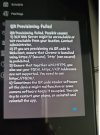
 

Attachments

  • WhatsApp Image 2024-01-13 at 11.56.10 AM.jpeg
    WhatsApp Image 2024-01-13 at 11.56.10 AM.jpeg
    217.7 KB · Views: 54
Hello,

which version of 3CX are you using?
 
…of the server…v18 or RC v20?

There have been a few threads about this message in the last month or so. Check DNS, server blacklist, firewall…can you try both cell data and wireless?
 
I was referring to the server, anyways, as mentioned above, perform a firewall check in 3CX.perhaps you have not forwarded all the ports that need to be used for apps.
 
  • Like
Reactions: TheodorosG_3CX
From your mobile device open you browser and ensure that you are able to reach the FQDN with https.
 
Hello everyone,
Allow me to join the thread of discussion, as I encounter the same issue, with some unexpected twists...

The 3CX server is on premise, V18 update 9.

Within the same company, I have some Android users who can provision their 3CX app, and a minority who can't.
Those who can't obtain the same error message as posted above in this thread.

One Android smartphone could be provisioned a few days ago, let's say on extension 110,
and later, the user needed to also provision 128 on the same app. But this time, the app returned the error message.
And worse, after resetting his smartphone app, it could not reclaim his 110 extension either ! None would provision.

In the meantime, I could provision other smartphones on his extension, so no issue server or account-wise.

So, following your advice, we've tried together to resolve the FQDN from his smartphone.
Nope, until we flushed the DNS cache, and switched again to mobile cell data. Then, the FQDN was reachable.
BUT... back in 3CX app, the QR code still didn't work !

I was already puzzled by the fact that some phones could provision themselves and others couldn't,
but with this one successively succeeding and then failing to provision itself, I'm even more stunned.

What could be faulty here ? The smartphone is connected via mobile data, DNS resolution works, the 3CX app has been deinstalled/reinstalled, it works from other devices... ("scratching my head") :rolleyes:
 
@Qwalys_Tech First of all it would be good to know the models. It has been noticed for example that in some Samsung Android devices there were issues with scanning a QR code and has been reported to Samsung. This did not affect only 3CX but other applications as well. Have you also tried for example to use a 3rd party app for QR scanning?
Since the DNS resolution works this might also require to check from your network.
 
Thank you Theodoros for your interest in the matter. :)

I could retrieve the model information : Samsung Galaxy A32.

Further tests will be done with third-party, QR code-based apps,
but still I'm pondering : since 3CX QR code provisioning worked at first attempt on this very device,
is it even possible for become inoperative afterwards, against all odds ?

Despite knowing the context where it succeeded, we couldn't reproduce the initial successful provisioning.
Same connection, same account, same steps. Isn't it maddening ? xD
 
Yes this should not be the case however this is related with the device QR scanner. Let me know the results upon further testing.
 
Hello fellows 3CXers, I'm back with good news : QR Code provisioning is now functional !

To speak shortly, the culprit was the on-premise firewall. Nothing to do with the Samsung device.

After many, many fruitless tests, we finally had the enlightening idea to scan the QR code with a regular QR decoder.
It allowed us to check and try every URL requested by 3CX app.

When the flashed QR Code contained the local IP 3CX Server address (set on a separate VLAN from informatics), the firewall blocked this.
When the flashed QR Code contained the FQDN path, this time the DNS request wasn't properly redirected.

So, the network admin was involved and we worked together to ensure the correct routing of these two scenarios.

And... there was also an error factor from the user, who was connected to a public Wifi network of his company, whose security policies prevented any connection to the local 3CX server.

Now, things are running smooth and fine. I hope you'll find success in this specific case !
 
  • Like
Reactions: Vali_3CX
@Qwalys_Tech Great news, thank you for sharing your resolution to the community ;)
 
Status
Not open for further replies.

Members Online Now

Forum statistics

Threads
111,831
Messages
589,277
Members
164,660
Latest member
RJenkinsROCK