Question on templates for phones

Status
Not open for further replies.

eplatt

New User
Joined
Jan 17, 2024
Messages
1
Reaction score
0
Hi,

Question on phones - my two phones are Fanvil phones, a desktop and cordless.

I guess the question isn't per se Fanvil specific but I figured I'd start here.

So looking for two things:

First I have a fanvill / Wansvil W610W . I found a cutom XML to add the phone.
It added it to auto provision, but the web interface URL is only a link to the admin portal, it http://192.168.1.3/ - I also have the X7-V2 and that has the full login URL, ie http://admin:[email protected] .
How can I change the URL in the User / IP Phone section so it has the same (full) URL as the X7, including the user/password?
Second: In the provisioning, how do I add custom fields?

So there's a lot of settings that aren't anywhere in 3CX. Like for example, dial send delay - when I enter a phone #, how long until the phone 'sends'? If I change the setting, when the phone reprovisions, that setting is gone.

Thanks :)
(It's a self hosted 3cx if that matters.
 
How can I change the URL in the User / IP Phone section so it has the same (full) URL as the X7, including the user/password?
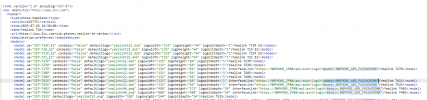
This is in the template - note the highlighted section of a yealink template (interfacelink):
1705544577672.png

Second: In the provisioning, how do I add custom fields?
Lol. You hardcode it into the template.
Advanced: You add a custom variable into the 3CX database (parameters) and call it in the template. But you cannot go adding fields in the Admin UI.
 
  • Like
Reactions: Evolute IT
This is in the template - note the highlighted section of a yealink template (interfacelink):
View attachment 39236


Lol. You hardcode it into the template.
Advanced: You add a custom variable into the 3CX database (parameters) and call it in the template. But you cannot go adding fields in the Admin UI.
So in the Phone template, I have:
<interfaceLink>http://admin:%%PHONE_WEB_PASSWORD%%@%%PHONE_IP%%</interfaceLink>
But in the user section / phone template, it's simply http://192.168.1.X .It DOES show the web password and web username.
I guess what I'm asking on adding custom fields in the template is how? Like what format and how do I find out what the field name or what not is ?
Thanks :)
 
So in the Phone template, I have:
<interfaceLink>http://admin:%%PHONE_WEB_PASSWORD%%@%%PHONE_IP%%</interfaceLink>
I don't think you use the </interfaceLink> closing tag (or even the opening the way you have it), but I don't know Fanvil well enough to say. I also don't know that http is supported, I always use https. Lastly, the phone needs to accept credentials like this - old polycoms for example don't.

I guess what I'm asking on adding custom fields in the template is how? Like what format and how do I find out what the field name or what not is ?
Look at manufacturer documentation on what you can place in there and what formats it will accept. For 3CX side, look at https://www.3cx.com/docs/phone-provisioning-variables/
 
I don't think you use the </interfaceLink> closing tag (or even the opening the way you have it), but I don't know Fanvil well enough to say. I also don't know that http is supported, I always use https. Lastly, the phone needs to accept credentials like this - old polycoms for example don't.


Look at manufacturer documentation on what you can place in there and what formats it will accept. For 3CX side, look at https://www.3cx.com/docs/phone-provisioning-variables/
Ok thanks I'll poke around.
If I modify the template - say I figure out what it needs for the full URL with password and modify the template, will that modify the already provisioned phone's "IP Phone" page? Or will that only modify it for phones provisioned going forward?

Thanks :)
 
Ok thanks I'll poke around.
If I modify the template - say I figure out what it needs for the full URL with password and modify the template, will that modify the already provisioned phone's "IP Phone" page? Or will that only modify it for phones provisioned going forward?

Thanks :)
You may have to reboot the phone for the new template to be applied to the phone.
 
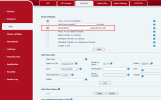
So there's a lot of settings that aren't anywhere in 3CX. Like for example, dial send delay - when I enter a phone #, how long until the phone 'sends'? If I change the setting, when the phone reprovisions, that setting is gone.
1706240446401.png
Hi

The corresponding function in our phone is the "Send after" configuration in the Dial plan, and the parameter for this configuration is <DialTimeoutvalue>5</DialTimeoutvalue>.
Perhaps a similar parameter can be added in the 3CX template.
 
Status
Not open for further replies.

Members Online Now

No members online now.

Forum statistics

Threads
111,835
Messages
589,289
Members
164,665
Latest member
dominik.pepel