- Joined
- May 30, 2025
- Messages
- 2
- Reaction score
- 2
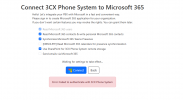
All for some reason we had an issue come up where something was messed up on the app registration or it was removed. The integration required reconfiguration, I go to click on the Reconfigure and it goes to the wizard. I do the connect, fill in the GA Credentials for M365 and do the full consent but then it comes back to the first screen and says Waiting for settings to take effect and sits on that screen for a while and then after a while it goes to Error: Failed to authenticate with 3CX Phone System. I have tried on a seperate GA M365 account and also tried with a different System Owner account on the 3CX Instance. I cannot seem to figure out why it keeps doing this. I can see it creating the 3CX Wizard App under Enterprise Applications even after I remove everything from Enterprise Applications and under App Registration. And I also see it creating the 3CX App under App Registration, in fact it recreates a new one each time I try to reconfigure and still does that if I delete the others and including permanent delete. I have even gone into Custom Parameters on 3CX and under M365 removed everything in the Value so it would be a fresh start and it does the same thing. I made sure all except the Obselete was check marked and even like in this screen shot removed Send emails and also the Use Sharepoint for 3CX Phone System Remote Storage and does the same. Any hints or help would be highly helpful.