Salesforce Integration

Status
Not open for further replies.

RobAC

New User
Joined
May 27, 2022
Messages
7
Reaction score
0
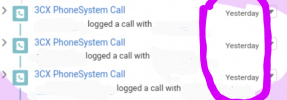
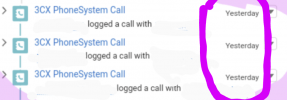
Hi all - First time poster here! We have integrated with Salesforce and it's mostly going well. However inbound & outbound calls are appearing in UTC when displayed as a task under the activity pane in Salesforce but all other time details for that call are correctly displayed in local time. We are in Australia so calls are being displayed -10hrs before local time as attached.

Any help would be appreciated - I think it's on the 3CX side more than Salesforce as all other activities are displaying correctly in local time.

Regards Rob
 

Attachments
  • Screenshot_20220527-160709.png
    Screenshot_20220527-160709.png
    798.9 KB · Views: 9
Last edited:
Hi Rob,

Please follow these steps

1. Check the 3CX Server Timezone and Salesforce Timezone both are the same.
2. If not the same, Change the Salesforce Timezone which is equal to 3CX Server Timezone. You can change the Timezone in Salesforce under User settings.


Thanks
AG
 
  • Like
Reactions: Evolute IT
Thanks AG

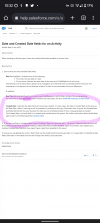
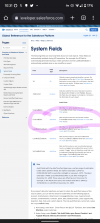
I just checked and they are the same. All dates/times are correct except for that header date on the task in the activity window. To test I did change my user timezone and made it GMT +12 (from GMT +10) and all other dates/times moved forward by that adjustment except for the header date. It should have moved into 'today' from 'yesterday' but stayed as 'yesterday'. It makes me wonder if it's a creation date generated by the 3CX API without any time stamp and that's why it didn't move? See attached for some potential explanation of this

Regards Rob
 

Attachments

  • Screenshot_20220526-223234.png
    Screenshot_20220526-223234.png
    284.5 KB · Views: 11
  • Screenshot_20220526-223155.png
    Screenshot_20220526-223155.png
    450.1 KB · Views: 11
Hi Rob,

3CX will not generate any date creation value, It will be created from the Salesforce side. The 3CX will only send the call details to Salesforce. Then Salesforce will take care of this activity creation part against the calls.

Regards,
AG
 
thanks AG - really appreciate your help with this
 
Hi again AG!

Would you know where/how/what controls that date field that only seems to appear in the call task header as it seems to be controlled separately to all other date/time fields associated with the call (they are all correct and reflect the users timezone)

Regards Rob
 

Attachments

  • Screenshot_20220527-160709.png
    Screenshot_20220527-160709.png
    798.9 KB · Views: 5
The issue could be from the template (@edossantos can verify)

<Value Key="ActivityDate" Passes="0" Type="String">[[CallStartTimeLocal].ToString("yyyy-MM-dd")]</Value>

Notice that is uses the local time and not UTC.
 
  • Like
Reactions: RobAC
thanks for that tip! where can I find the template to check it?
 
thanks to those who helped out !

3CX have updated the templates as follows:

• SalesforceV2_Local_Zeros: will specify the ActivityDate as the local (Australia - GMT+10) date formatted as 2022-06-03T00:00:00.000Z

So that has corrected the Activity Date (ie Due Date) which is great.

However the "day" appearing in the activity timeline is still a day behind and oddly enough if you edit the "due date" and simply save it (as it's actually correct) the Activity timeline "day" changes from "yesterday" to "today" which is perfect...... except it reverts to "yesterday" on the next refresh of that page so it looks like a Salesforce issue and it seems identical to the issue reported below except it's a task not an event.

https://trailblazer.salesforce.com/...ous-day-when-viewed-through-activity-timeline
 
Last edited:
Status
Not open for further replies.

Forum statistics

Threads
112,147
Messages
590,961
Members
165,167
Latest member
Finatra.us