Search message log for Whatsapp Messages

Status
Not open for further replies.

yesss-de

Premier Customer
Joined
Aug 14, 2020
Messages
43
Reaction score
9
Hi,

i would like to know where to look if i want logs on received whatsapp messages.

We had one of our bosses test sending messages from an unknown number pretending to be a customer to one of our branches. the branch didnt respond, after talking to them they told him the message never arrived, so he asks us to see if messages came through. i can see only some of those 11 messages we received

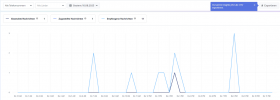
the messages from 7 AM and 10 AM i can find nowhere, but the messages from 1PM-3PM can be found.
1691746148267.png

looking into the Whatsapp manager (service by meta) we see messages arrive at several times. but i cannot seem to find some of those messages in the message logs or anywhere else i tried looking for it.
Thank you in advance
 
@yesss-de are you pointing the whatsapp messages to a queue or user extension?

are the agents marking the chats as dealt with after the conversation?

currently, are you able to receive whatsapp messages from any number or you just have the issue sending whatsapp messages with one specific number?
 
@yesss-de are you pointing the whatsapp messages to a queue or user extension?

are the agents marking the chats as dealt with after the conversation?

currently, are you able to receive whatsapp messages from any number or you just have the issue sending whatsapp messages with one specific number?
i am pointing to whatsapp messages to a queue, i cannot confirm if someone took the chat and marked it as done, but i should be able to see it somewhere, right?
with some queues the agents mark as done some others are leaving it
they know they cannot communicate after 24 hours

we should be able to receive messages to any number added as whatsapp number (becasue we tested it with all numbers when we added them) but to make sure i have to know where to find the logs etc.
 
but to make sure i have to know where to find the logs etc.
You can set the pbx logs to verbose mode from the activity logs, replicate the event and then go to the activity log --- click on logs ---- and take a look on the log files managementconsole.log and systemservice.log

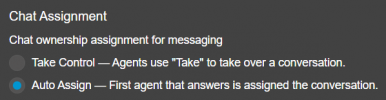
Please note that if you are sending the messages to a queue then the agents must take the chats and once finished click on dealt with.

Have a great day!
 
Hi, changed to verbose

unfortunately the error happens sporadically and we cannot replicate it really

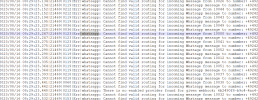
we are getting 2 types of errors (this is before debug mode on), when it happens in debug mode i will add another screenshot
1. cannot find valid routing
2. there is no enabled provider

1692170503716.png
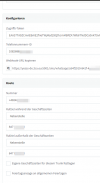
I looked into the settings, the settings for this particular number are correct they are pointing to the queue of our branch so i dont know why it has routing errors
1692170690087.png

second error i didnt find the specific webhook yet but will provide info if i find something
 
Please note that the destination for whatsapp messages should be a user extension or queue.

Could you please check that, and mark the whatsapp messages received as dealt with.
 
2nd error is solved, there was a wrong/old webhook saved, corrected it on meta side and now shouldn't get this error anymore

1st Problem:
Yes, they always are pointing to a Queue, but they are not always marked done by the person.

i found out that mostly they dont even take the chat to one specific agent but just write in the chat and leave it in the queue for everyone to see

is it a necessity to mark conversations as done?

will errors happen if conversations (especially those not taken by a specific agent) are not marked as done?
 
Within the queue enable the following

1692204936534.png

The message related to the routing, please check that the whatsapp number is dedicated to messages only and not in use with other trunks for routing calls.
 
The message related to the routing, please check that the whatsapp number is dedicated to messages only and not in use with other trunks for routing calls.

Unfortunately all whatsapp numbers we have also have sip trunks so no, i cannot give you a whatsapp only number (that would completely destroy the purpose of whatsapp for business for us),
but i have found this in the logs (see below), which tells me it is indeed the whatsapp message having routing problems and not a call

2023/08/16 11:13:00.576|21469|0188|Err|whatsapp: Cannot find valid routing for incoming message from 10041 to number: +49242 2023/08/16 11:13:00.576|21469|0188|Err|whatsapp: Cannot find valid routing for incoming Whatsapp message to number: +49242

all of this led to the final point:
2023/08/16 11:13:00.599|21469|0094|Dbg|[GS] Response = ACK: Success=False, ErrorType=NoPermission, ErrorCode=null, Parameter=, Message=Cannot create new conversation with sms participant when previous one is not closed

what exactly does that mean and dont spare details, i want to get to the bottom of this
 
Hi Yess, kindly ask to your 3CX partner to open a support ticket with us, so we can gather the logs from that pbx and help you with this.

Thanks!
 
That's nice that you referred us to our dealer, they have been trying for about 1 month with 3CX support to find the cause and a solution to the problem. We lose numerous customer messages every day, so orders. As a customer, how can we raise the priority or escalate in your 3CX Support?
I would like this problem to be solved.
 
Hi @yesss-de if your partner already have a support ticket with us, then all must be followed through that channel, please bear us.
 
Status
Not open for further replies.

Members Online Now

Forum statistics

Threads
111,842
Messages
589,320
Members
164,677
Latest member
skander