Solved Sign in to Microsoft 365 impossible

Status
Not open for further replies.

Connexium Partner

Silver Partner
Basic Certified
Joined
Mar 4, 2020
Messages
115
Reaction score
57
Hello,

I am currently setting up the Microsoft 365 Integration in 3CX for testing purposes.
I'm on the Enterprise version 18.0 Build 314
I am following this Youtube Video and also this guide and am currently stuck a STEP 3.5


When I click this:


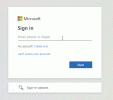
It sends me to the login page, but I can't actually log in.. It keeps looping back to the login page...
chrome_DqGNp2NKjU.gif


Any suggestion is appreciated.

Thank you
 

Attachments

  • 1643809915816.png
    1643809915816.png
    2.6 KB · Views: 8
Are you sure you have added all the right permissions and action when creating the App Registration? What is easily overlooked is this step:
In the app "Authentication" section, on "Implicit grant" enable "ID Tokens".

Also is this account you are trying to log in with the admin MS365 account?

Maybe also consider trying to log into your 3CX from a different browser in case it is a cache issue.
 
  • Like
Reactions: Evolute IT
Ok, I fixed my issue. I hope my post could help someone else:

My mistakes:

1- I am not acquainted with all the Microsoft online tools and services (365, Teams, Azure, Live, etc..) It's all a big mess if you ask me.
2- I first started by creating a Microsoft Azure trial account when I tried to follow the instructions in the video.
3- Realizing something was wrong, that I probably needed a Microsoft 365 account, I then started a trial for an Office 365 account... But it was a family plan.. duh!
4- I finally created an Office 365 business plan (price per users) and logged in with my new [email protected] credential.

It's now working

1643829561747.png

Cheers
 
  • Like
Reactions: NickD_3CX
Thank you very much for sharing this info and I am glad you managed to figure it out.

I am sure someone some day will find this very useful!

I'll go ahead and flag this one as 'Solved'.
 
Status
Not open for further replies.