


- Joined
- Apr 30, 2015
- Messages
- 24
- Reaction score
- 7
It should be noted this is NOT a 3CX bug and was caused by the user, but hopefully 3CX will add this to their hitlist and add the suggestion whenever they get time.
This issue shutdown our business for 5 hours today while we called our SIP providers and researched 3cx, finally found the issue.
We happen to find "Allow inbound calls" and "Allow outbound calls" under the OPTIONS tab for each SIP was unchecked.
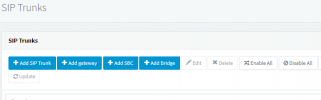
Somehow we must have clicked on the DISABLE All button on the SIP trunks page and all inbound and outbound calls where being rejected on all our trunks with different carriers.
NOTE: We do not recall receiving any kind of warning when clicking that button.
Suggestion: It would be EXTREAMLY helpful if the SIP is disabled for IN & OUT bound calls something other than a GREEN dot shows on the left side of each SIP Trunk, a green dot gives the false appearance everything is normal and it clearly is not.
The errors we noticed in the logs (in case someone is searching this issue)
a) A trunk failover occurs or max amount of calls available through trunk has been exceeded
b) Had no available outgoing trunk(s) for Call
This issue shutdown our business for 5 hours today while we called our SIP providers and researched 3cx, finally found the issue.
We happen to find "Allow inbound calls" and "Allow outbound calls" under the OPTIONS tab for each SIP was unchecked.
Somehow we must have clicked on the DISABLE All button on the SIP trunks page and all inbound and outbound calls where being rejected on all our trunks with different carriers.
NOTE: We do not recall receiving any kind of warning when clicking that button.
Suggestion: It would be EXTREAMLY helpful if the SIP is disabled for IN & OUT bound calls something other than a GREEN dot shows on the left side of each SIP Trunk, a green dot gives the false appearance everything is normal and it clearly is not.
The errors we noticed in the logs (in case someone is searching this issue)
a) A trunk failover occurs or max amount of calls available through trunk has been exceeded
b) Had no available outgoing trunk(s) for Call
Upvote
0


