- Joined
- Jan 15, 2019
- Messages
- 5
- Reaction score
- 1
Hi all. We have 3CX V20 hosted in Azure (Linux VM in Azure - in a VNET, public IP on VM, no firewall in front of the VM). We are re-using our existing SIP trunk - Telstra SIP Connect (We're in AU).
We used the supported SIP trunk template AU > Telstra - SIP Trunk. The SIP trunk registers and connects but after 10 mins, it unregisters.
Event log errors:
Registration at Telstra SIP Connect Generic has failed. Destination (sip:x.x.x.x:5060;transport=TCP;lr) is not reachable, DNS error resolving FQDN, or service is not available.
Trunk L:10000(Telstra SIP Connect Generic) has changed status to unregistered. This means that no more calls will pass via this trunk. Please check your network connection and the voip provider or other SIP PBX
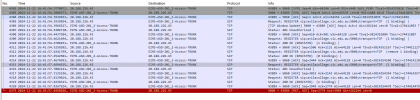
Firewall check in the 3CX admin console passed all checks. Packet captures in the 3CX admin console and in Azure VM are showing outgoing TCP traffic, but getting no response when the SIP trunk fails to register. I've lodged a case with the SIP provider and the packet capture from their end is not seeing any incoming TCP post the initial register that was successful in the first minute. See attached.
SIP provider is pointing to TCP packets dropped in Azure, possible on the public IP interface, because the packet capture in Azure VM shows the VM's private IP. Seems weird that we have over half dozen 3CX servers hosted in Azure but never come across this.
As a temporary workaround, we have resorted to re-creating the SIP trunk as generic and changing the transport protocol to UDP. This registers and connects the SIP trunk indefinitely, but introduces other issues, like calls randomly dropping due to UDP fragmentation.
Just wondering anyone has experienced similar issues with the SIP trunk unregistering after 10 mins, or is using the same SIP trunk and could offer some insights. Thank you.
We used the supported SIP trunk template AU > Telstra - SIP Trunk. The SIP trunk registers and connects but after 10 mins, it unregisters.
Event log errors:
Registration at Telstra SIP Connect Generic has failed. Destination (sip:x.x.x.x:5060;transport=TCP;lr) is not reachable, DNS error resolving FQDN, or service is not available.
Trunk L:10000(Telstra SIP Connect Generic) has changed status to unregistered. This means that no more calls will pass via this trunk. Please check your network connection and the voip provider or other SIP PBX
Firewall check in the 3CX admin console passed all checks. Packet captures in the 3CX admin console and in Azure VM are showing outgoing TCP traffic, but getting no response when the SIP trunk fails to register. I've lodged a case with the SIP provider and the packet capture from their end is not seeing any incoming TCP post the initial register that was successful in the first minute. See attached.
SIP provider is pointing to TCP packets dropped in Azure, possible on the public IP interface, because the packet capture in Azure VM shows the VM's private IP. Seems weird that we have over half dozen 3CX servers hosted in Azure but never come across this.
As a temporary workaround, we have resorted to re-creating the SIP trunk as generic and changing the transport protocol to UDP. This registers and connects the SIP trunk indefinitely, but introduces other issues, like calls randomly dropping due to UDP fragmentation.
Just wondering anyone has experienced similar issues with the SIP trunk unregistering after 10 mins, or is using the same SIP trunk and could offer some insights. Thank you.