SSL Autorenewal is not working

Status
Not open for further replies.

NonStop

Free User
Intermediate Cert.
Joined
May 6, 2021
Messages
16
Reaction score
1
Hello,

our SSL certificate on 3CX is not renewing automatically. It expires every 3 months and I had to renew it manually twice already, however it was working before that time. Any idea how to fix this problem?

Many thanks!
 
Could you first provide a bit more info on this system?

• What exact version are you running. Check under "Dashboard >> Information >> Version/License".
• Where is it hosted and how was it deployed(On-prem with 3CX ISO, Google using PBX Express, etc). If On-Prem what Hypervisor and what OS?
• Are you using a 3CX FQDN or a custom one?
• How did you force renewal these two times, was it based on our guide?
• Do you have any outbound traffic restrictions on the network that might be contributing to the issue?
• Did you ever have License activation issues for this 3CX Instance or any errors when you hit "Refresh License Key Info" under "Settings >> License"? Make absolutely sure that you can resolve and contact both activation.3cx.com and activate.3cx.com from the 3CX Host.
 
Last edited by a moderator:
Version 18.0 Update 2 Build 314
On Premise - 3CX ISO - Debian 10 (VMWare)
Using 3CX - ourdomain.3cx.cz
Yes exactly this guide
We dont have any outbound traffic restrictions as it was working normally
I can confirm reachability from the host to both
 
I'll PM you for a bit more information on this.
 
We are also experiencing the same issue, although Chrome wont let us login, Edge does
 
Last edited:
We are also experiencing the same issue, although Chrome wont let us login, Edge does
You mean the SSL certificate does not renew automatically? Did this happen more than once or just the last time?

Also, what do you mean you can't login with Chrome but you can with Edge? What do you see exactly?
 
Just this week and only once. I have tested by Pinging to the activation servers and that fails.

What port/protocol does the activation server use? Also what port/protocol is used when doing certificate update?

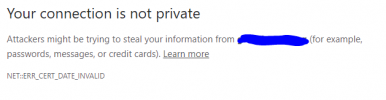
When I use Chrome (Version 96.0.4664.110 (Official Build) (64-bit)) I get the following and there is no option to continue. A work colleague with the same version of Chrome can login.

With Edge (Version 96.0.1054.62 (Official build) (64-bit)) I can see the admin screen.

Both are reporting SSL expired.


1640166588404.png
 
Last edited:
Just this week and only once. I have tested by Pinging to the activation servers and that fails.
Pinging our activation servers won't work but that's expected. Our activation servers require TCP traffic on port 443, for the ssl certificate it's Let's Encrypt servers so just make sure that you're not blocking any outbound traffic next time the renewal is due and you should be fine.
 
I'm getting this error in the nginx error logs

r3.o.lencr.org could not be resolved (110: Operation timed out) while requesting certificate status, responder: r3.o.lencr.org, certificate:
 
r3.o.lencr.org could not be resolved (110: Operation timed out) while requesting certificate status, responder: r3.o.lencr.org, certificate:
I'm not 100% sure this is the cause of the issue, but, to at least eliminate the possibility, make sure that the 3CX Host can resolve that FQDN and generally make sure the server's DNS configuration is in order. I'd recommend setting the server's primary DNS server to Google's (8.8.8.8) and then try again.
 
Status
Not open for further replies.

Forum statistics

Threads
111,974
Messages
590,083
Members
164,901
Latest member
Silent_Guru