StrictTrustMatching

Status
Not open for further replies.

rc179

Silver Partner
Basic Certified
Joined
May 1, 2020
Messages
97
Reaction score
11
I saw this changed in the audit log, the log referenced the SIP Trunk configuration.

But I don't see where it is in the configuration. I'm guessing that the field is labeled something else in the GUI.

We are having some unusual inbound call behavior, and I don't know why this was changed or where to change it back.

The log:
Updated values
Gateway:
StrictTrustMatching: true

Any help on where this is and what it does is greatly appreciated.
 
Hello @rc179

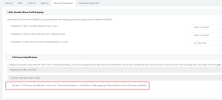
The specific field is the "Use both "Call Source Identification" rules and "Caller Number/Name -> CalledNum" field mappings" option which can be found in the SIP trunk settings > Inbound parameters > Call source identification (see attached screenshot).
 

Attachments

  • inbound_parameters.png
    inbound_parameters.png
    84.9 KB · Views: 8
Hi @rc179

According to your other post, I think someone is changing the trunk settings. Make sure the settings match the settings of the default template.
 
  • Like
Reactions: PanagiotisL_3CX
Hi @rc179

According to your other post, I think someone is changing the trunk settings. Make sure the settings match the settings of the default template.
That does look like what happened, someone changed the trunk and then changed it back, but it had the affect of applying t6he newer template that required the addition of "+" to the DID.

It's good knowing how this happened. We can now be pro-active and change all our other systems before someone does this again and takes the customer off-line.
 
  • Like
Reactions: YiannisH_3CX
Status
Not open for further replies.

Latest Posts

Members Online Now

Forum statistics

Threads
111,831
Messages
589,276
Members
164,660
Latest member
RJenkinsROCK