System owner appears after 18U6 but should not

Status
Not open for further replies.

TigerTech

Forum User
Joined
May 1, 2018
Messages
55
Reaction score
9
Running on-prem 18U6 on Debian. I have been using another extension - not the one I use for daily phone calls - to administer the system. This is to divide my access for security reasons - for the same reason I don't administer my other IT systems with the accounts that I use for word processing, email, etc. For obvious reasons I do not advertise the second extension, and there is no phone associated with it. With U6 I made this other extension the System Administrator. Although this secondary extension was previously hidden to other users, after 18U6 the extension appears to other users in the Android app (18.1.3.130) as "Not registered". I see that the System Administrator group has locked "Show presence to group members", and I thought that would explain it, but the extension doesn't appear to other users in the web client. Is there something I can do to hide that extension again, or is this a bug?
 
@TigerTech
Unlike the other clients, WebClient is "bound" to the PBX, that means each PBX has its own WebClient, while other clients can connect to different versions of PBXes, so it could be a bug in the Android client, we'll check tomorrow. Meantime, if possible, can you please check if a DA and iOS client works correctly on your aforementioned configuration?
Thanks.
 
@TigerTech Aside from any potential Android issue, you can create a new group and put the system owner extension in it, so it isn't visible to the DEFAULT group.
 
Now it comes in my mind another posibility, since you mentioned that the extension appears as "Not Registered" - then it might be possible that WebClient is configured with "show unregistered extensions" turned OFF, while the Android client have it turned ON. This setting is per client, not per extension/PBX.
 
Upon further testing, this doesn't appear to be an issue with just the Android app. Checking the web client today I am seeing the admin's extension. Further, it shows as "Available" even though there's no phone associated with it. Also, when I enable "Show unregistered extensions" in the old Windows app (16.3.0.264 - I'm not sure of the support status of this) the admin user appears in the extension list there, too, although strangely, if I search for the name or extension it is not found.

Although I can add the admin extension to another group, it doesn't appear to be possible to remove it from the Default group. This, combined with the fact that we cannot uncheck "Show presence to group members" for the sysadmin in Default seems to suggest that in 18U6 it's now impossible to hide the sysadmin account from Default users. I hope I'm missing something or that this will corrected in the next release.
 
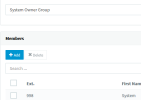
After upgrading I created a new ext. for System Owner and removed it from the DEFAULT group without issue. What trouble are you having? (Users > Groups [button] > click DEFAULT > click X next to that extension)
 
We should be able to remove the Owner extension from appearing. Can the R&D team look into this?
Thanks!
 
We should be able to remove the Owner extension from appearing. Can the R&D team look into this?
Thanks!
Do you have it in its own group?
 
No, I don't. It's in the default group.
Nevertheless, I think we should be able to remove the extension from appearing, regardless in which group you are part of.
 
  • Like
Reactions: techcare
After upgrading I created a new ext. for System Owner and removed it from the DEFAULT group without issue. What trouble are you having? (Users > Groups [button] > click DEFAULT > click X next to that extension)

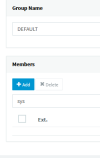
As a test I added the owner user to another group. I can remove the user from that group. I can also remove other users from DEFAULT. However, the X to remove the owner from DEFAULT is grayed out and disabled.
 
X to remove the owner from DEFAULT is grayed out and disabled
Interesting, because I did that myself on our dedicated server. Is yours 3CX hosted, or StartUP? Did you try checking that extension's box and clicking the Delete button above the list of Members, rather than the X? I don't remember which I used.
1675875196416.png1675875213354.png
 
Not only cannot I not select the X for the owner in DEFAULT, the owner extension's checkbox is disabled, too, and so I cannot try the Delete button. All of this aside, I agree with @taranch that we should be able to prevent the owner's extension from appearing regardless of group membership.
 
  • Like
Reactions: techcare
we should be able to prevent the owner's extension from appearing regardless of group membership.
I understand your point, but from the perspective of StartUP the owner is probably one of the users in the system and not an unused extension. All of these changes seem to be geared towards StartUP having only web client access.

I tried logging in to the web client as the system owner and it even looks like it will let me remove it from its one group (the Remove button enabled but I didn't click it).

I should clarify that in the management console if I open the System Owner Group, I can't remove the System Owner from that group. But that's it's only group since I didn't try adding it back to DEFAULT. (and am now inclined not to...!) For users in the DEFAULT group the button does enable to delete them.

If your 3CX is self-hosted also then I don't know why it would be different for you. Possibly due to timing, because I created the new group right away after creating the extension?
 
For users in the DEFAULT group the button does enable to delete them.
I can't explain why that doesn't work on our system. I hope that 3CX will soon be able to provide an answer to allow the system owner to be hidden on our setup and on other installs with the same issue.

3CX - feel free to post here or PM me if you need more information.
 
I've got an self-hosted 16CC Enterprise system. On premise at the client's.
 
I understand your point, but from the perspective of StartUP the owner is probably one of the users in the system and not an unused extension. All of these changes seem to be geared towards StartUP having only web client access.

I tried logging in to the web client as the system owner and it even looks like it will let me remove it from its one group (the Remove button enabled but I didn't click it).

I should clarify that in the management console if I open the System Owner Group, I can't remove the System Owner from that group. But that's it's only group since I didn't try adding it back to DEFAULT. (and am now inclined not to...!) For users in the DEFAULT group the button does enable to delete them.

If your 3CX is self-hosted also then I don't know why it would be different for you. Possibly due to timing, because I created the new group right away after creating the extension?
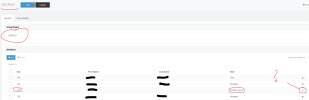
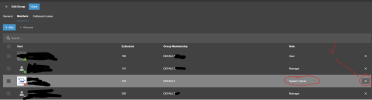
@SteveITS & @TigerTech - I think the difference is that you cannot remove a user from the DEFAULT group in the old interface, but I could remove them from the new.

When I did this however the extension (which I was logged into in the new interface) lost SYSTEM OWNER rights. So make sure you have another log in to rectify!

The biggest thing is that if I now need to have an extension associated with SYSTEM OWNER rights then I should be able to hide this extension globally.

Here is a screen shot of old admin panel:

1675908765479.png

Here is a screen shot of new admin panel:

1675908871459.png
 
I did find a work around. In the new admin interface if you add a group (e.g. ADMIN) then assign System Owner. Then go back to the user and change primary group to ADMIN. Now go back to DEFAULT group and remove System Owner extension it didn't lose System Owner privileges with me.
 
Although I try to stay aware of 3CX changes, it appears I have missed something. How does one access the new admin panel?
 
Although I try to stay aware of 3CX changes, it appears I have missed something. How does one access the new admin panel?
Visit /webclient (just like accessing the webclient) and sign in with a user that has admin rights. There will be an admin button at the bottom of the nav bar that's on the left side.

Direct URL: https://example.fqdn.com:5001/webclient/#/office
 
  • Like
Reactions: techcare and N_G
I did find a work around. In the new admin interface if you add a group (e.g. ADMIN) then assign System Owner. Then go back to the user and change primary group to ADMIN. Now go back to DEFAULT group and remove System Owner extension it didn't lose System Owner privileges with me.
I am doing the below for our clients we updated and it's (still) working for me.
  • Log into management console (not web client)
  • Create System Owner extension
  • Create System Owner Group group with System Owner as a member (in one step, if that matters)
  • Remove System Owner from DEFAULT group
  • Set System Owner ext as the System Owner role of the System Owner Group
 
  • Like
Reactions: Evolute IT
Status
Not open for further replies.

Members Online Now

Forum statistics

Threads
111,831
Messages
589,277
Members
164,660
Latest member
RJenkinsROCK