Solved T43U and Call Parking/Retrieval

Status
Not open for further replies.

herculeon

Silver Partner
Basic Certified
Joined
Apr 26, 2023
Messages
16
Reaction score
4
I have tried to find how to program the buttons on a T43U to do a DSSKey to go to Call Park 1 and retrieval of park 1. I need 3 buttons for this a total of 3 parks and 3 retrievals. I have tried all different types of things. I tried setting it speed dial, and BLF, and set the type to Call Park and Retrieve PArk. these all seem to go to dead air. When I do *00 it goes to on-hold music and then I go to any phone and dial *10 and I can pick it up. The customer wants buttons. Can someone give me an idiot's guide on setting up T43U with call park and retrievals? I say idiots guide because I apparently cannot figure it out and it has been about a week for me trying to figure it out and I am still nowhere close to figuring it out.
 
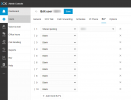
You can do this by configuring shared parking slots on the BLF keys from the admin console or webclient of the specific extension you are logged into with an IP phone configured on the same extension.

1695240525632.png

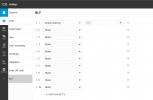
From the admin console, navigate to the Admin (bottom right) and then users, access the user's extensions settings > BLF section, and from the drop-down, choose a Shared Parking slot that is available to you, then once assigned to the slot, and press Save, reboot the IP phone.

1695240558166.png

Or, from a webclient, navigate to the settings > BLF section and the shared parking slots there, press Save, and reboot your IP phone.
 
Last edited:
  • Like
Reactions: herculeon
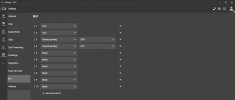
Hi, did you try configuring the blf keys as follows:

1695240625017.png
 
  • Like
Reactions: herculeon
@herculeon re: dead air, note Shared Parking has its own music setting separate from hold music or conference room music. See Settings/Call Parking. Configured as shown above if you just dial the SP0 button you should park yourself and hear music.
 
Thank you, Gentlemen.
I asked for an idiot's guide and I got pictures. can't get any more idiot proof than that. I am putting it in place now. I will have to test tomorrow. Thank you both.
 
Gentlemen,
I have gone to the clients location and tested the config. Everything works as advertised. I appreciate the assistance given and the rapidity it was given. Next time I have an issue, I will come here rather than flounder around.
 
You are welcome. We are glad that this is resolved for you.
 
@herculeon re: dead air, note Shared Parking has its own music setting separate from hold music or conference room music. See Settings/Call Parking. Configured as shown above if you just dial the SP0 button you should park yourself and hear music.
The dead was a big reason why I knew it was not working. The music comes out on the park now with the new config
 
  • Like
Reactions: Charles_3CX
Status
Not open for further replies.

Members Online Now

No members online now.

Forum statistics

Threads
111,831
Messages
589,277
Members
164,660
Latest member
RJenkinsROCK