TEAMS call forwarding

nsh

New User
Joined
Oct 29, 2021
Messages
7
Reaction score
2
Hi, can you help with the situation:
An external call from 3cx arrives in my teams client (teams A), I transfer this call to the 3cx extension number, this extension number also has linked Teams account (Teams B).
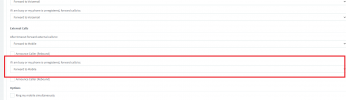
We use only Teams Clients (3cx clients always closed), so this call is treated as external and immediately goes into the 3cx forwarding rule (screenshot 1)
Is it possible to route this call from 3cx back to Teams B?
 

Attachments

  • screenshot 1.png
    screenshot 1.png
    15.7 KB · Views: 13
Hi!

The short answer is 'No'.

Let me explain though, when User A has answered the incoming call using their Teams Client and they want to transfer it to another user, if the other user also uses the Teams Client, then they CAN transfer it, but using the Teams Name/Email, not the 3CX Extension that has been allocated to User B.

User A of course can transfer to 3CX Extensions, the catch is though that the recipient must NOT answer from the Teams Client, they can answer using any other client like Webclient, Mobile app, Desktop app, IP Phone, etc, just not Teams.
 
Thank you for answer!

We tried to forward using Teams Name, but it's another problem, when User A transfer external call to User B with the Teams Account Name:
User B have a Teams setting to forward calls to his mobile number. So, User A redirecting external call to User B and Teams transfer this call to User B mobile number.
But 3cx reject this transfer, because Teams use external caller number as source, for example:
invite from sip:[email protected]:5061;user=phone>
499 xxx.xxxxx.ru "Caller is forbidden"
[CM503013]: Call(C:288): Incoming call rejected, caller is unknown;
 
If you will be using things like Forwarding Rules, I would highly recommend you get users to try and get accustomed to the 3CX Apps, where all this functionality is available.
 
Thanks, i like 3cx client, very functional, but we prefer to use one client for users convinience, so maybe we can somehow allow calls like [email protected]?
 
Understandable that you want to use 1 client, however I'm not sure if this could be technically possible considering how Teams does the transfer/forwarding. We shall look into though and if there is something that can be done, without risking anything from a security perspective, we shall consider it.

In the mean time, if customer for convenience want to use 1 client only, our recommendation is that 1 client to be a 3CX Client.
 
  • Like
Reactions: nsh

Members Online Now

No members online now.

Forum statistics

Threads
111,831
Messages
589,277
Members
164,660
Latest member
RJenkinsROCK