Teams Direct routing with resource accounts

hhunger

Customer
Joined
Aug 24, 2021
Messages
4
Reaction score
0
3cx on premise 18.0.1880

I was able to set up user sync and direct routing for all users/extensions without issues.
Now I would like to redirect one 3cx extension to a Teams resource account (required for a call queue) but it doesn't show up when selecting Add Users in the User Sync Tab. A resource account is disabled by design, may this be the reason? Or what is the criteria for an O365 account to be available for the User sync?
 
Hi!

Unfortunately only regular users can be added and found in the "User Sync" tab.
 
Hi NickD,

Technically it is a regular user, only some attributes are different. Do you know what exactly the "filter" for the user sync is? Like which attributes/licenses the user object needs to have? I could then see if changing them would make it available for user sync without breaking the resource account functionality.

Or what would be the recommended way for forwarding an extension to a resource account?

thanks
 
Not sure what attributes are filtered out in the list there, what I know is that it needs to be a actual user.
I'll try and find out and revert back.
 
Linked to this, I'm trying to add a Teams Rooms 'user' to 3CX, but its not showing up. It's got appropriate licensing (Rooms Standard account that includes Voice).

It shows up in MS under the list of Users, and also on the Teams Admin users page, just not in 3CX when trying to sync users. Think its the same issue as hhunger has
 
Hi NickD,

Technically it is a regular user, only some attributes are different. Do you know what exactly the "filter" for the user sync is? Like which attributes/licenses the user object needs to have? I could then see if changing them would make it available for user sync without breaking the resource account functionality.

Or what would be the recommended way for forwarding an extension to a resource account?

thanks
I found some more information, apparently if you add a First and Last Name to a Resource Account in Azure AD, then it should appear in the Users list in the 3CX Management Console.
 
My resource account already has a First and Last Name set but unfortunately it still doesn't show up. Even after a few days and many resyncs and refreshes in between. Assigning a E5 license also doesn't make a difference.
But I have Azure AD accounts without a Last Name that show up anyway, so there must be other filters in place.
It would be great if you could ask again for more details about it.

Thanks
 
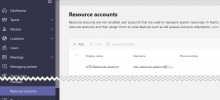
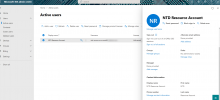
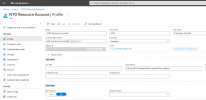
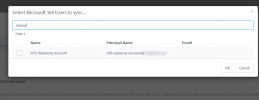
What can I say, it seems to just be that:
1630335645964.png
1630335684075.png
1630335724274.png
1630335754180.png
 
  • Like
Reactions: TomR and Evolute IT
  • Like
Reactions: NickD_3CX
required for a call queue

For call queues, you have to use 3CX Queues and the agent should be handling the calls from 3CX the 3CX APPs and not from the Teams Client or through a "Lync" queue.

Roll Out​

A common misconception is that all of your users within 3CX shall/can now be assigned to MS Teams for the convenience of placing calls directly from the Teams client. Microsoft Direct Routing, aka Teams “Phone System”, isn’t for everyone in an organization! Firstly it’s pricey (an additional 8$ per user per month on Microsoft AddOn fees) and the functionality for handling calls is low. Our integration is great for the executive level of a company that only needs to deal with simple, reliable in- and outbound calls from the Teams app. Staff, Warehouse, CallCenter staff must reside in 3CX. More functions - no add-on fees - better customer service.
 
  • Like
Reactions: Evolute IT
Strange.. Just tested it again with a fresh resource account and setting First or Last name doesn't make a difference for me.

Anyway, I saw that you have "Block sign in" set to No. When I make this change as well, it shows up, so might be a combination of the two. But have to see if allowing a "free voice user" to sign in is possible. So at the moment I can sync it but it still doesn't redirect the calls. Could be that this is because of the sign in or other reasons (e.g. it is not possible to set an extension for a resource account). I'll see if I can find out more.

@StefanW
Sure, we are already using 3CX call queues and they basically work great together with Teams. So quickly the question came up why the agents would still need the 3CX client. Only reason at the moment is to get in and out of a queue. That's why we wanted to try the Teams call queue. All of the other phone system features will stay in 3CX.
 
Strange.. Just tested it again with a fresh resource account and setting First or Last name doesn't make a difference for me.

Anyway, I saw that you have "Block sign in" set to No. When I make this change as well, it shows up, so might be a combination of the two. But have to see if allowing a "free voice user" to sign in is possible. So at the moment I can sync it but it still doesn't redirect the calls. Could be that this is because of the sign in or other reasons (e.g. it is not possible to set an extension for a resource account). I'll see if I can find out more.

@StefanW
Sure, we are already using 3CX call queues and they basically work great together with Teams. So quickly the question came up why the agents would still need the 3CX client. Only reason at the moment is to get in and out of a queue. That's why we wanted to try the Teams call queue. All of the other phone system features will stay in 3CX.
Teams queues are not as advanced as the 3CX ones...
 
Strange.. Just tested it again with a fresh resource account and setting First or Last name doesn't make a difference for me.

Anyway, I saw that you have "Block sign in" set to No. When I make this change as well, it shows up, so might be a combination of the two. But have to see if allowing a "free voice user" to sign in is possible. So at the moment I can sync it but it still doesn't redirect the calls. Could be that this is because of the sign in or other reasons (e.g. it is not possible to set an extension for a resource account). I'll see if I can find out more.

@StefanW
Sure, we are already using 3CX call queues and they basically work great together with Teams. So quickly the question came up why the agents would still need the 3CX client. Only reason at the moment is to get in and out of a queue. That's why we wanted to try the Teams call queue. All of the other phone system features will stay in 3CX.

you can use dial codes but still I strongly recommend for queue agents to use the 3cx apps over the teams client!
 

Members Online Now

Forum statistics

Threads
111,831
Messages
589,277
Members
164,660
Latest member
RJenkinsROCK