


- Joined
- Jan 23, 2008
- Messages
- 55
- Reaction score
- 21
We have setup the integration on our own system and also on a client's system. That all went well and was simple enough. We have a selection of users on each system currently set to use Teams as their client for testing/eval etc.
The issue we have is that when you receive a call in Teams and then want to transfer to another extension in 3CX (doesn't seem to matter whether they have Teams integration enabled or not), you aren't able to pick their 3CX extension when you start entering their name in the transfer field. If you enter the 3CX extension number itself, it shows as an 'External' number, so you cannot see the presence of the intended recipient. We also tried adding some users to the Speed Dial section in Teams, and this only seems to look at certain fields from within AD (in both instances, we have Hybrid Exchange with AD sync'd to Entra ID).
Has anyone else seen this? It's quite limiting in terms of trying to use Teams as the soft client, yet losing ability to see presence of others when trying to transfer to them. And we want to retain the call within the 3CX system from a call reporting perspective + being able to see in progress calls on custom dashboards that we've built to work with 3CX.
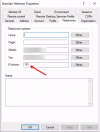
I realise that there's no 3CX phonebook sync as such. Is it as simple as this? And that is, it just won't work? Are there ways to customise what fields from AD will appear in the Teams address book such that you will be able to see presence when entering a name and then able to selec the the 3CX extension number? For example, I tried entering my extension number into the IP Phone field in AD, but Teams doesn't seem to recongnise this... Refer below. But my Fax number appears as an option in Teams. Adding the 3CX extension number to the Fax Number field is at best clumsy and unintuitive.
Cheers
The issue we have is that when you receive a call in Teams and then want to transfer to another extension in 3CX (doesn't seem to matter whether they have Teams integration enabled or not), you aren't able to pick their 3CX extension when you start entering their name in the transfer field. If you enter the 3CX extension number itself, it shows as an 'External' number, so you cannot see the presence of the intended recipient. We also tried adding some users to the Speed Dial section in Teams, and this only seems to look at certain fields from within AD (in both instances, we have Hybrid Exchange with AD sync'd to Entra ID).
Has anyone else seen this? It's quite limiting in terms of trying to use Teams as the soft client, yet losing ability to see presence of others when trying to transfer to them. And we want to retain the call within the 3CX system from a call reporting perspective + being able to see in progress calls on custom dashboards that we've built to work with 3CX.
I realise that there's no 3CX phonebook sync as such. Is it as simple as this? And that is, it just won't work? Are there ways to customise what fields from AD will appear in the Teams address book such that you will be able to see presence when entering a name and then able to selec the the 3CX extension number? For example, I tried entering my extension number into the IP Phone field in AD, but Teams doesn't seem to recongnise this... Refer below. But my Fax number appears as an option in Teams. Adding the 3CX extension number to the Fax Number field is at best clumsy and unintuitive.
Cheers


