- Joined
- Feb 7, 2019
- Messages
- 36
- Reaction score
- 4
Hi there,
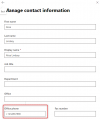
I tried the setting of Teams Direct Routing in Microsoft 365 Integration, and completed the former 3 steps. However, there is an error in the Users Script of step 4.
Actually, I've set the user's onpremlineuri parameter to "tel:+8150XXXXXXXX;ext=220", and already waiting for more than 24 hours.
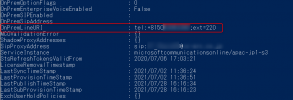
Is there any method to make 3CX recognize the phone number? Or anything else needed?
I tried the setting of Teams Direct Routing in Microsoft 365 Integration, and completed the former 3 steps. However, there is an error in the Users Script of step 4.
# Phone number invalid: Set-CsUser -Identity user@XXXXX -OnPremLineURI "tel:NOT_E_164;ext=220" -EnterpriseVoiceEnabled $true -HostedVoiceMail $true
$users_ids = @()
Actually, I've set the user's onpremlineuri parameter to "tel:+8150XXXXXXXX;ext=220", and already waiting for more than 24 hours.
Is there any method to make 3CX recognize the phone number? Or anything else needed?