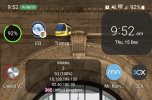
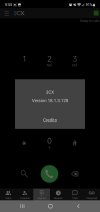
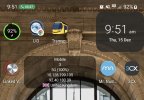
timer appearing in notification bar

Status
Not open for further replies.

raindropuk

Free User
Basic Certified
Joined
Oct 15, 2020
Messages
2
Reaction score
1
I've noticed since the last update on the Beta app, a timer appears in the notification bar during a call if I minimise the app. However, this morning a call came in which rings several phones. I pressed on decline call as this call was for one of my colleagues. When he answered it, the timer appeared on my phone in the notification bar, even though the call had been answered on another phone! The only way I could get rid of it, was to make a call from my phone app and then cancel the call.

I have attached screenshots.

Main system is up-to-date: 18.0 update 5 (build 418)
Android app: v18.1.3.128 updated 6th December 2022

Cheers,
Phil.
 

Attachments

  • Image0.jpg
    Image0.jpg
    192.6 KB · Views: 35
  • Image1.jpg
    Image1.jpg
    183.6 KB · Views: 33
  • Image2.jpg
    Image2.jpg
    66.8 KB · Views: 31
  • Like
Reactions: Rai Amit 44710
Same issue here
 
Hi @raindropuk

Thanks for your feedback.
Are you able to reproduce this issue?
This is a known Android OS issue which can be replicated on other Android apps. We are hoping that it will be fixed in future updated.
 
Hi. Same issue here. I've noticed that this is a new feature since the latest app update, and this issue can be replicated exactly as @raindropuk has described it.
 
Hi @Shragi Leitner , @raindropuk

Could you give us more information of how this is being reproduced.
As we already stated, this is an android issue. But if we are able to reproduce this internally, we might work on a workaround for this.

Multiple phones ring, assuming this is a call queue/ring group.

Could you send us step by step instructions of how you are replicating this issue by PM message?
Also please provide the Android device model, version and whether you are using any custom launchers or not

Thanks
 
  • Like
Reactions: Evolute IT
Hi @Shragi Leitner , @raindropuk

Could you give us more information of how this is being reproduced.
As we already stated, this is an android issue. But if we are able to reproduce this internally, we might work on a workaround for this.

Multiple phones ring, assuming this is a call queue/ring group.

Could you send us step by step instructions of how you are replicating this issue by PM message?
Also please provide the Android device model, version and whether you are using any custom launchers or not

Thanks
yes, will PM shortly with extension numbers / groups etc.
 
One of my customers are reporting exactly the same problem to us and is reproduceable.

The Extension of him has a Yealink-Phone and the 3CX-App for Android assigned. If the User takes a call on the Yealink the Smartphone is showing the Timer in the Left upper corner. This timer does not disappear after the yealink-phone ends the call.

The Smartphone-Data:
Samsung Galaxy A51
Android-Version: 12
3CX Version 18.1.3.128

I tested to reproduce this bug on a Motorola with Android 12, but on this Samrtphone all is working like it should be.
 
@raindropuk @ata @Shragi Leitner @comjoinit.de

We have released V18.1.3.129 Beta of the Android client today which should fix this issue:
https://www.3cx.com/blog/change-log/3cxphone-android-build-history/

You'd have to join the BETA program to get this update.
Just launch the Play Store, search for 3CX, and while in the Apps information page (where you see Uninstall & Open) scroll down to where it reads "Join the Beta" and press "Join".

It may take a few minutes but once complete you will see the Update button available for you to install the latest Beta app.

At any time, you may leave the Beta program by following the same steps to where the app information page reads 'You're a beta tester' and tap on 'Leave'

Should you still reproduce the issue, please let us know, together with your phone brand, model and Android version
 
I still have this ( annoying, but not critical ) error.
Nokia G20, Android 12, 3CX Version 18.1.3.130.
 
@citmarc Thanks for your feedback.
As we already stated, this is an android issue.
We will investigate the issue and provide a fix
 
Last edited:
@citmarc

We have released V18.1.3.135 Beta of the Android client today which should fix this issue:
https://www.3cx.com/blog/change-log/3cxphone-android-build-history/

You'd have to join the BETA program to get this update.
Just launch the Play Store, search for 3CX, and while in the Apps information page (where you see Uninstall & Open) scroll down to where it reads "Join the Beta" and press "Join".

It may take a few minutes but once complete you will see the Update button available for you to install the latest Beta app.

At any time, you may leave the Beta program by following the same steps to where the app information page reads 'You're a beta tester' and tap on 'Leave'
 
Just tested. It seems to work! Thank you.
 
Status
Not open for further replies.

Members Online Now

Forum statistics

Threads
111,831
Messages
589,277
Members
164,660
Latest member
RJenkinsROCK