- Joined
- Jul 9, 2024
- Messages
- 14
- Reaction score
- 10
Just putting this out there as I've had a few issues configuring multi-number trunks on 3CX with Gradwell. I finally got to the bottom of it!
The issue
Configuring individual numbers per trunk was fine, but when trying to add additional numbers through the same trunk, the numbers wouldn't dial in. I was seeing an issue like in this thread: https://www.3cx.com/community/threads/407-proxy-authentication-required.55960/
In the past, I have called up Gradwell and they made changes which I wasn't sure about, and then it worked. I was under the impression the fix was something to do with amending the way numbers were entered on the 3CX server to include a wildcard asterisk at the start, such as *123456789
That wildcard asterisk might help, but it wasn't the whole root cause.
The solution
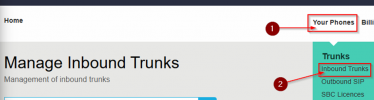
On Gradwell's portal, you can go to 'Core Setup' and then 'Phone Numbers'. In there, you can specify the trunk each number should use. You need to specify the Outbound SIP trunk configured on Gradwell that your 3CX server connects to. After that, your issue should be sorted!
The problem had been bugging me for months and I'd even had to go through the workaround of making ~80 unique SIP trunk credentials (a set of credentials for each number) on Gradwell's portal before I discovered this solution.
The issue
Configuring individual numbers per trunk was fine, but when trying to add additional numbers through the same trunk, the numbers wouldn't dial in. I was seeing an issue like in this thread: https://www.3cx.com/community/threads/407-proxy-authentication-required.55960/
In the past, I have called up Gradwell and they made changes which I wasn't sure about, and then it worked. I was under the impression the fix was something to do with amending the way numbers were entered on the 3CX server to include a wildcard asterisk at the start, such as *123456789
That wildcard asterisk might help, but it wasn't the whole root cause.
The solution
On Gradwell's portal, you can go to 'Core Setup' and then 'Phone Numbers'. In there, you can specify the trunk each number should use. You need to specify the Outbound SIP trunk configured on Gradwell that your 3CX server connects to. After that, your issue should be sorted!
The problem had been bugging me for months and I'd even had to go through the workaround of making ~80 unique SIP trunk credentials (a set of credentials for each number) on Gradwell's portal before I discovered this solution.