Solved Unable to create webhook

Status
Not open for further replies.

Infinitel

Silver Partner
Basic Certified
Joined
Jun 5, 2017
Messages
10
Reaction score
2
Hello,

I've been trying to create a WhatsApp trunk on our 3CX but I can not complete the Webhook step at Meta Developers. Always says it's unable to validate the URL and the identifier.

I've rebooted my 3CX (on premise), I've checked it's fully accesible from public address. When I open the webhook URL from an outside web browser it returns a body with content: "0" and nothing else.

I've deleted the WhatsApp trunk and recreated it twice but the result is the same.
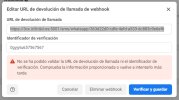
webhook.jpg
 
Hello, Infinitel,
Verification code is ok. most likely problem that your 3cx is not reachable by facebook. Check firewall configuration, try to open webhook URL in browser on your PC, it should open and show "0".
 
I've tried from a remote PC and it opens properly. As I said, It's fully reachable from outside. I get a "0" response body from everywhere but Facebook rejects the URL.
 
Send me please in private message full URL that you try to use with Facebook.
 
Hello,

I am having the same problem. I can open the webhoock-url but meta can't verify it.
Any solution yet?.

Best Regards
Daniel Wolf
 
Hello, Daniel,

Send me please your FQDN in private message.
 
The most possible cause -- problems with SSL certificate (if you use your custom ssl certificate).
 
Can you describe the problem more specific? There is a let's encrypt certificate that contains the fqdn (without the :5001)
 
I wrote you private message. Looks like your certificate issued for another domain.
 
Hello,
I've the same issue, I've a custom certificate from a public CA (trusted in all browser).
Is there an issue with this public CA or because is a wildcard?
Thanks
 
Unfortunately, i've tried with a new certificat (non wildcard) from the same CA, it doesn't works
 
I've change my certificate to Let's encrypt and it doesn't works.
I really don't understand any help will be appreciate.
Two instances
Prod: custom certificate (Let's encrypt): KO
Test: 3cx FQDN: OK
 
3CX helped to solve this issue.
In my case with my own domain and certificate from public CA, the **-crt.pem didn't include the itermediate CA cert, so I added manualy in the **-crt.pem and now it's works.
If it's could help.
 
  • Like
Reactions: N_G
3CX helped to solve this issue.
In my case with my own domain and certificate from public CA, the **-crt.pem didn't include the itermediate CA cert, so I added manualy in the **-crt.pem and now it's works.
If it's could help.
Adding the intermediate certificate worked for me. My certificate was a Thawte Wildcard certificate which was not accepted until I included the intermediate CA certificate in my *-crt.pem file.
 
We could solve the problem by not using a wildcard certificate vom lets encrypt but using the "chained" version of the existing certificate.

With this we could exchange the test messages.
 
Hello,

I am having the same problem. I can open the webhoock-url but meta can't verify it.
Using default assigned let's encrypt cert. FQDN is in cert.

Best Regards
Mark
 
Hello Mark,

in the certificates from lets encrypt we got were some more version of ertificates.
There was a "chained" version. We exchanged the existing certificate with the chained version and Meta was happy.

Testing with https://whatsmychaincert.com was helpful.

Best Regards
Daniel
 
Hello,

I've been trying to create a WhatsApp trunk on our 3CX but I can not complete the Webhook step at Meta Developers. Always says it's unable to validate the URL and the identifier.

I've rebooted my 3CX (on premise), I've checked it's fully accesible from public address. When I open the webhook URL from an outside web browser it returns a body with content: "0" and nothing else.

I've deleted the WhatsApp trunk and recreated it twice but the result is the same.

View attachment 32131
I published a free video walkthrough for setting up the WhatsApp integration for 3CX. You can access the video here. There is a little longer introduction than is perhaps necessary, but hopefully you will find the information helpful.
 
Hello Mark,

in the certificates from lets encrypt we got were some more version of ertificates.
There was a "chained" version. We exchanged the existing certificate with the chained version and Meta was happy.

Testing with https://whatsmychaincert.com was helpful.

Best Regards
Daniel
Problem solved thanks
 
Status
Not open for further replies.