Unregistered Extensions with PBX in DMZ

Status
Not open for further replies.

Dath

New User
Basic Certified
Joined
Mar 1, 2021
Messages
15
Reaction score
2
  • 3CX Version, Professional Annual 18.0 Update 2
  • Server OS, Debian 9
  • Is the 3CX Server Hosted and where? Hosted locally via vmWare
  • IP Phone Make/Model/Firmware version, snom760-SIP 8.9.3.88
  • Provisioning Method: Local
  • Trunk Provider or VoIP Gateway Make/Model, Vodafone
  • Has the Firewall Checker passed: YES
  • Are custom Phone Templates being used: NO
Hello guys,

I'm trying to setup a new local 3CX PBX in a DMZ. I've already got the connection to work from outside via the Android App, the connection via the Windows App from internal PCs works and provisioning from the local VoiP phones works.
The phones can get their provisioning when i enter the provisioning link manually, however afterwards they don't appear in the Webinterface and report themselves as unregistered.

At the moment i have Ports 5000, 5001 and 7000-8999 openend in the Firewall, are there other ports i have to open for the phones to talk to the PBX and appear in the Managament as extensions?
 
  • Like
Reactions: ChrisC_3CX
Hi,

I checked that i have Ports 443, 5000, 5001, 5060, 5090 and 7000-8999 opened on both the way to and from the PBX to the local network with the IP phones.
The other ones mentioned in the doc don't really make sense to me for local communication, right?
 
If you have opened 5060 UDP/TCP, then at least now the Local IP Phones should show as registered, assuming you have configured the whole network correctly.

If they aren't still registering, there are 2 cases:
  • Either the SIP REGISTER messages from the IP Phones aren't reaching the 3CX Server.
  • Or, the 3CX Server cannot reply, or is getting the wrong reply IP, so the responses aren't reaching the IP Phone
Usually in these cases, network captures are your friend.
You can make captures on the 3CX Side from the MC --> Activity Log.
I believe you can also make captures on snom phones as well.

Do this and try to determine what is happening with the SIP Register packets.

Tip:
When you open the captures with Wireshark, you can use the filter sip.CSeq.method==REGISTER to immediately show what you the types of packages you are looking for.
 
From what i see the only packets with SIP requests from the phone go out to the Multicast address of 224.0.1.75.

Does that mean that something in the provisioning progress went wrong? The phone shows the correct extension number and name to what i configured in the PBX.

Another thing i noticed is that the SIP requests from outside (the SIP provider) somehow get deferred from outgoing Port 5060 to 5062 on the PBX without any changes being made to the Port Forward NAT or Outbound NAT and consequently failing the Firewall check now
 
From what i see the only packets with SIP requests from the phone go out to the Multicast address of 224.0.1.75.
If the phone is provisioned correctly, and it most likely is because you say that name appears, then this is why the phone is not registering, the REGISTER request from the phone is not reaching the 3CX Server.
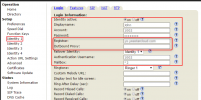
Now, either the routing is incorrect, or the phone is faulty, or for whatever reason, in the phone UI settings, the 3CX Server address is incorrect.
1642586659946.png

I would suggest first checking the phone UI and check that the 3CX server address is correct (which it should be...), otherwise I would put my money on something with the routing.

Another thing i noticed is that the SIP requests from outside (the SIP provider) somehow get deferred from outgoing Port 5060 to 5062 on the PBX without any changes being made to the Port Forward NAT or Outbound NAT and consequently failing the Firewall check now
This makes my above suspicion stronger that there is something with the routing... You installed 3CX with SIP Port 5060 right?
 
Last edited:
This makes my above suspicion stronger that there is something with the routing... You installed 3CX with SIP Port 5060 right?
Yes, i didn't make any custom changes to the ports during the installation process and the port for the registrar Server is 5060 by default.

I would suggest first checking the phone UI and check that the 3CX server address is correct (which it should be...), otherwise I would put my money on something with the routing.
I'll confirm the settings in the phone UI, but since the requests to the Multicast address are coming from the phone itself it shouldn't be routing, right?
 
I'll confirm the settings in the phone UI, but since the requests to the Multicast address are coming from the phone itself it shouldn't be routing, right?
You gave the clue yourself, Multicast works, but Unicast isn't working. The phone sends a specific REGISTER request to a specific IP and port after it's registered.
 
looking at the log file of the IP phone i see the following error repeating itself:
[ERROR ] SIP: request 1000071 destination invalid Udp:"PBXIP":5060 313634323538393035383231303336-p6zyp6szdmx3

Already unchecked "Disallow use of extension outside the LAN" since the request is coming from local net to the DMZ where the PBX is
 
Last edited:
looking at the log file of the IP phone i see the following error repeating itself:
[ERROR ] SIP: request 1000071 destination invalid Udp:"PBXIP":5060 313634323538393035383231303336-p6zyp6szdmx3

Already unchecked "Disallow use of extension outside the LAN" since the request is coming from local net to the DMZ where the PBX is
Good call on the "Disallow use of extension outside the LAN", unfortunately though I don't know what the other error means... It's as if it doesn't know how to route the packet?
 
Found the error, the Alias used in the rule on the DMZ Firewall didn't include Port 5060 and blocked it, strange that it didn't show in the logs.

Didn't really realise that by 'remote extension' IP phones in a different network than the LAN of the PBX are meant.

Now to check with the SIP provider why the SIP Server wants to talk to the PBX on port 5062.

Thanks for your help Nick.
 
  • Like
Reactions: NickD_3CX
Found the error, the Alias used in the rule on the DMZ Firewall didn't include Port 5060 and blocked it, strange that it didn't show in the logs.

Didn't really realise that by 'remote extension' IP phones in a different network than the LAN of the PBX are meant.

Now to check with the SIP provider why the SIP Server wants to talk to the PBX on port 5062.

Thanks for your help Nick.
You are very welcome!
 
Status
Not open for further replies.

Forum statistics

Threads
111,974
Messages
590,083
Members
164,901
Latest member
Silent_Guru