- Joined
- Jun 3, 2022
- Messages
- 36
- Reaction score
- 3
On the Android app, when I go into my contact list, there are typically three icons shown to the right of each contact in the list (start new call, start new chat, and menu). Yesterday all three of these icons were present for most all of my contacts, but today, the start new chat icon does not show up for any of my external contacts.
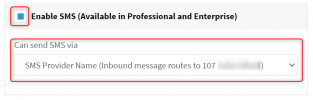
This is a new install I have been working on setting up over the course of about a week and the SMS function does work correctly. I just can't initiate a new SMS chat from the contacts list. Any idea why this icon is not available? I have tried different number formats and that does not appear to make any difference. This morning I was looking through many of the settings and options in the 3CX management console, but I didn't change anything that would affect SMS or the chat features (at least I don't think I did). I am still learning...
This is a new install I have been working on setting up over the course of about a week and the SMS function does work correctly. I just can't initiate a new SMS chat from the contacts list. Any idea why this icon is not available? I have tried different number formats and that does not appear to make any difference. This morning I was looking through many of the settings and options in the 3CX management console, but I didn't change anything that would affect SMS or the chat features (at least I don't think I did). I am still learning...