Solved v18 - Office 365 integration just hanging

Status
Not open for further replies.

TomR

Free User
Joined
Aug 16, 2021
Messages
10
Reaction score
2
Hi all,

I updated to V18 from V16 on two separate systems (one was Debian 9 to 10, one was 10 on v16) and they're both showing the same 'error'.

I'm trying to get Teams Dialling working on our Teams Room setup, so naturally, the first step is O365 integration and that's where the problem is.

I follow the instructions to the letter - when it comes to clicking "Sign in to Microsoft 365" it progresses as expected, I allow permissions and it forwards me back to the 3CX UI. This is where it just hangs and then the error box pops up saying something along the lines that the UI has timed out (or similar).

I left it for a while all to no avail - I even left it 24 hours and the page was still blank, with the progress bar moving in the top. No discernable errors were shown. I tried this on a second instance with the same results - the only way I could recover was to restore the VM from a backup, a reboot didn't clear the 'error'.

Has anyone seen anything similar or have any pointers, please?

Thanks
 

Attachments

  • screenshot.png
    screenshot.png
    116.2 KB · Views: 21
It might be worth clearing the browser cache, or even better install a new browser and try it.

Also, have you med sure your HTTPS port is open on your Firewall?

Last, at the top of this page, once you press the "Sign in to Microsoft 365", a banner should appear that checks the status.
Does anything like this appear there? Is that where you see the error? Could you make a screenshot of it if it does?
 
  • Like
Reactions: Evolute IT
Hi Nick,

Thanks for the response, unfortunately, all to no avail.

Here's the steps and outcomes:

1) Edge browser (Chrome) in incognito - previously tried with normal and clearing cache/cookies (didn't work)
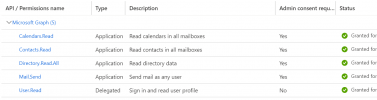
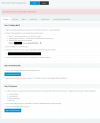
2) Azure credentials/instructions followed (Screenshots 1 & 2) - certificate uploaded/permissions granted
3) Details entered into the 3CX O365 page. Tried clicking okay after entering the App ID and not clicking okay previously (in case that stored something) - both make no difference
4) Click sign in to Microsoft 365 and the permissions on Office comes up, click Accept and then it returns me to 3CX
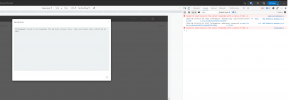
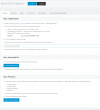
5) Screenshot 4 is what it does - doesn't display anything useful and doesn't allow clicking OK. You can click cancel and come back to this page, but it's the same. Port 443 is open as you can see, I'm accessing via HTTPS on the standard port. Clearing cache or new browser (even tried iOS Safari) leads to the same hanging page, as does a reboot.
6) Screenshot 5. This is the console log and the 'Server Error' pop-up that comes about after approx 1-2 mins.

Thanks
 

Attachments

  • screenshot1.PNG
    screenshot1.PNG
    52.9 KB · Views: 15
  • screenshot2.png
    screenshot2.png
    45.9 KB · Views: 14
  • screenshot3.png
    screenshot3.png
    157.6 KB · Views: 15
  • screenshot4.png
    screenshot4.png
    39.3 KB · Views: 14
  • screenshot5.png
    screenshot5.png
    93.8 KB · Views: 15
Any further ideas please?
 
What rights do the MS 365 user have that you login with to give permissions?

We typically use a user who has global admin rights in 365 for that initial setup.
 
Thanks - yes, the user I'm logging in to give the permissions is a Global Admin as you say. I very much doubt its a Microsoft permissions issue as I've not encountered a similar error/situation on other platforms that use the APIs
 
Where and how are they installed? On premise/Azure/AWS?

Is there any firewall filtering outbound traffic that could be stopping it? I ask as for our customers we use additional security features/services on the firewall like IPS, Geo-IP blocking, AV and App control.
 
It's installed on an XEN hypervisor, hosted on bare-metal with OVH.

It's a good suggestion regarding firewall as it normally is the cause of most issues, but there essentially isn't one. There's no filtering in or out on that VM and its 'out-of-the-box' 3CX install so to say. Nothing regarding firewalling or traffic management has been changed that didn't come set as default from a fresh ISO (albeit v16 which was upgraded to v18).
 
Today I thought I would install a new ISO on Vultr to rule out OVH. It worked, so there is something strange on OVH even though no ports are blocked.

I can take it from here but may be useful if other people run into issues - there's something on OVH that appears to be blocking something else, yet the 3CX install works flawlessly apart from this
 
I'm glad to hear you've got a solid clue! It is strange indeed though.
 
Status
Not open for further replies.