V18 Update 8 - 75% phones do not register

Status
Not open for further replies.

vk4kij

Bronze Partner
Basic Certified
Joined
Aug 11, 2021
Messages
10
Reaction score
0
Hi,

When updating from v18 update 7 to update 8 only 56 extensions out of 236 extensions register.
Going back to the previous version and all extensions return.

Due to the customer specifications we are using TCP for transport and STUN.

Looking in Wireshark the unregistered extension sends an INFO packet to port 5060, but no response from the server.

I have deleted one of the unregistered extension and re-added it, still no registration.

I removed the firewall from the server side, no difference.

I have tried STUN and LocalLan, no difference.

Most phones on the system are Yealink, does not seem to be any relation to model types.

Thanks for any help.

Ian.
 
Do you have ports forwarded for all 236 of them?
 
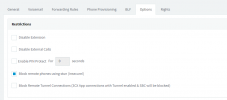
i believe v18 update 8 is where by default the block stun was turned on. See below in the user options
1708030393249.png
 
Do you have ports forwarded for all 236 of them?
Hi Steve,

No.

It has worked in all previous versions as it is. The system has been running since 2020.

The problem has only occurred starting with update 8, I tried update 9 overnight as well.

Ian.
 
STUN connection is relatively (in)famous for working until it doesn't. When it was supported the official way was to forward ports to the phone.

If you were going to pursue anything I would just spin up a few SBC VMs (maybe in high availability?) and convert them. It will be way more reliable, and besides in v20 they will either need that or have you set up a custom template to keep using STUN. With an SBC the connection is encrypted, as well.

This is from https://help.3cx.com/kb/en-us/9-ip-phones/197-why-are-my-stun-phones-not-working but that site is now offline. Maybe it will help.

Why are my STUN phones not working?

Remote STUN IP Phones usually require more configuration outside of 3CX therefore we recommend the use of the 3CX APPs in home offices, or using the 3CX SBC whenever deploying remote phones.

When this is not possible and you need to deploy phones in STUN you can follow our checklist below:

Prerequisites:
  • Access to the PBX Firewall
  • Access to the Remote Location Firewall
3CX Server Configuration:
  • Your SIP, HTTPS, RTP ports must be open: https://www.3cx.com/docs/ports/
  • Firewall checker must pass on all checks: https://www.3cx.com/docs/troubleshooting-firewall-checker/
  • Edit your extension, under Options > Restrictions and disable "Disallow use of extension outside the LAN (Remote extensions using Direct SIP or STUN will be blocked)"
  • Edit your extension, under Options > Troubleshooting and enable "PBX Delivers Audio"
  • For each IP Phone installed at the same Remote Location, set a:
    - Unique SIP port not shared with any other phone
    - Unique range of RTP ports, not overlapping with any other phones
    - Use our phone guides to see how to setup your specific model in Remote/RPS mode: https://www.3cx.com/sip-phones/
Remote Location Configuration:
  • Assign a static IP to each phone (or use DHCP reservation)
  • Port forward each phone's unique SIP port and RTP port range on the Remote Location Firewall
  • Disable any SIP ALG or SIP Helpers running on the Remote Location Firewall
 
  • Like
Reactions: GregG_3CX
STUN connection is relatively (in)famous for working until it doesn't. When it was supported the official way was to forward ports to the phone.

If you were going to pursue anything I would just spin up a few SBC VMs (maybe in high availability?) and convert them. It will be way more reliable, and besides in v20 they will either need that or have you set up a custom template to keep using STUN. With an SBC the connection is encrypted, as well.

This is from https://help.3cx.com/kb/en-us/9-ip-phones/197-why-are-my-stun-phones-not-working but that site is now offline. Maybe it will help.

Why are my STUN phones not working?

Remote STUN IP Phones usually require more configuration outside of 3CX therefore we recommend the use of the 3CX APPs in home offices, or using the 3CX SBC whenever deploying remote phones.

When this is not possible and you need to deploy phones in STUN you can follow our checklist below:

Prerequisites:
  • Access to the PBX Firewall
  • Access to the Remote Location Firewall
3CX Server Configuration:
  • Your SIP, HTTPS, RTP ports must be open: https://www.3cx.com/docs/ports/
  • Firewall checker must pass on all checks: https://www.3cx.com/docs/troubleshooting-firewall-checker/
  • Edit your extension, under Options > Restrictions and disable "Disallow use of extension outside the LAN (Remote extensions using Direct SIP or STUN will be blocked)"
  • Edit your extension, under Options > Troubleshooting and enable "PBX Delivers Audio"
  • For each IP Phone installed at the same Remote Location, set a:
    - Unique SIP port not shared with any other phone
    - Unique range of RTP ports, not overlapping with any other phones
    - Use our phone guides to see how to setup your specific model in Remote/RPS mode: https://www.3cx.com/sip-phones/
Remote Location Configuration:
  • Assign a static IP to each phone (or use DHCP reservation)
  • Port forward each phone's unique SIP port and RTP port range on the Remote Location Firewall
  • Disable any SIP ALG or SIP Helpers running on the Remote Location Firewall
Hi Steve,

It all works if I just revert to the previous version.

Cannot put in SBCs, no hardware allowed on site, except phones.

I have no access to their firewall.

Ian.
 
Cannot put in SBCs, no hardware allowed on site, except phones.

I have no access to their firewall.
Than you cant use 3cx... STUN isnt supported anymore and without access to the firewall you cant support anything 3cx related. Instead of an SBC you can use Routerphones.
 
As @bitn2 mentioned, router phone is the solution to all your problems. Check the guideline here.
 
  • Like
Reactions: bitn2
Hi,

This system has worked perfectly until v18 u8 came along and I saw no reason to fix what isn't broke and with the customer's requirements.

Therefore something has changed in the update to cause this.

Thanks for your help.

Ian.
 
I'm not saying you're wrong, but, you're using a feature that's not/no longer supported, not according to the prior documentation (e.g. forwarding the ports), and want them to make it work?

Given that 18u7 couldn't activate as of last summer it's pretty lucky you were able to install 18u8. (and, why not 18u9?)
 
  • Like
Reactions: bitn2
Using STUN requires also networking configuration on the location. However if this is not configured properly you might have several issues like the described. In this case you can try the router phone option as this will help you overcome such issues.
 
  • Like
Reactions: bitn2
Regardless of possible solutions, STUN is not the way forward...
 
Last edited:
Status
Not open for further replies.

Forum statistics

Threads
111,973
Messages
590,079
Members
164,899
Latest member
mazet