V20 3CX Not Responding to 183 Session Progress

Status
Not open for further replies.

krossh

Silver Partner
Advanced Certified
Joined
Feb 13, 2024
Messages
17
Reaction score
1
We recently upgraded some of our versions to V20 as the deadline is coming around next month. Has anyone else had any issues with 183 early media?

Extension Dials (XXX) XXX-XXXX as 10 digit, This being a LD call should be dialed as 11.

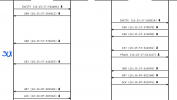
---------V20----------
-Send SIP 183 Session Progress to 3CX PBX
-PBX receives this 183
-early media sent to PBX on V20 for misdialed number (dialed 10 digit, needed 11)
-PBX does not respond to 183
-Calling extension gets default hold music for roughly 5 seconds
-Call Terminates from the SIP trunk side for no response from 3CX


We ARE the SIP trunk provider in this case as well , which the configuration was working with V18 perfectly prior to this upgrade.

Ever since the upgrade to V20 this has been a huge failure point for this version.

We have attempted to open support tickets with 3CX but were turned away, even though nothing on our end has changed in the signaling, and we are the opps. support on the SIP trunk side as well.


ANYONE else seen this issue? and if so any recommendations?
 

Attachments

  • 1714427212054.png
    1714427212054.png
    35 KB · Views: 27
-Calling extension gets default hold music for roughly 5 seconds
Are you using "MakeCall" to perform the calls? That would explain the music on hold instead of ringing.

Perform the call directly from a webclient or IP phone without using the Webclient to initiate a call to a different device and see if you still have the issue.
Please note that this behavior was exactly the same in V18. In both versions if you are using "MakeCall" you will get music on hold until the call is answered unless you had PRACK enabled in V18?

Without looking at captures from both systems it's hard to determine the difference.
 
We are making the calls directly from an IP phone, without the web client.

Where would I enable prack in V20? or V18
 
From what I can tell, 3CX does not support PRACK correct?

We were sending 183 and converting this to 200 on V18 to deliver Early Media.

Now that work around isnt working
 
@
Are you using "MakeCall" to perform the calls? That would explain the music on hold instead of ringing.

Perform the call directly from a webclient or IP phone without using the Webclient to initiate a call to a different device and see if you still have the issue.
Please note that this behavior was exactly the same in V18. In both versions if you are using "MakeCall" you will get music on hold until the call is answered unless you had PRACK enabled in V18?

Without looking at captures from both systems it's hard to determine the difference.
From what I can tell, 3CX does not support PRACK correct?

We were sending 183 and converting this to 200 on V18 to deliver Early Media.

Now that work around isnt working
 
Are you using "MakeCall" to perform the calls? That would explain the music on hold instead of ringing.

Perform the call directly from a webclient or IP phone without using the Webclient to initiate a call to a different device and see if you still have the issue.
Please note that this behavior was exactly the same in V18. In both versions if you are using "MakeCall" you will get music on hold until the call is answered unless you had PRACK enabled in V18?

Without looking at captures from both systems it's hard to determine the difference.
Could I send over a packet capture via DM?


V18, we send 183, convert the media to 200 with SDP. This was working.

Some of our instances are still on V18 working, however, our V20s no longer respond to this 200 with SDP and we just receive hold music on the extensions phone prior to the call hanging up.
 
Could I send over a packet capture via DM?


V18, we send 183, convert the media to 200 with SDP. This was working.

Some of our instances are still on V18 working, however, our V20s no longer respond to this 200 with SDP and we just receive hold music on the extensions phone prior to the call hanging up.
Hello, have you found any solutions on that ?
Same issue here.
 
Hello, have you found any solutions on that ?
Same issue here.
Yes,

We were able to resolve the issue. In the SDP, we were sending "sendonly" and this needed to be changed to sendreceive. That cleared up our issue so far completely. I think this would have probably fixed our issues on V18 at the time as well.
 
  • Like
Reactions: PetrosGR
Yes,

We were able to resolve the issue. In the SDP, we were sending "sendonly" and this needed to be changed to sendreceive. That cleared up our issue so far completely. I think this would have probably fixed our issues on V18 at the time as well.
Thank yo for your reply !

Can you tell me how can i set the same to my PBX v20 ?

TY
 
Thank yo for your reply !

Can you tell me how can i set the same to my PBX v20 ?

TY
This parameter has to be changed on the SIP trunk incoming side. We are both the partner as well as the
 
**partner as well as the SIP provider**
 
Status
Not open for further replies.

Latest Posts

Members Online Now

No members online now.

Forum statistics

Threads
111,831
Messages
589,276
Members
164,660
Latest member
RJenkinsROCK