Solved Weird Extension issue

Status
Not open for further replies.

BCS Tech

Customer
Joined
Aug 21, 2014
Messages
84
Reaction score
10
We have something odd happening with 4 extensions on one system. The system has about 30 extension total in two locations.

Issue with 4 extensions. 305, 309, 312, 314

These 4 can talk to each other but not to others.
Others can talk to each other, just not to the four.
The four cannot hear the person calling, but the person calling can hear the 4 extension users speaking.
Its almost like these 4 have their incoming audio muted for all incoming extension to extension calls except between each other.
Incoming calls from outside work fine

All 4 phones are Yealink T46U's. All have the latest firmware for 3CX
There are other T46U phones in the the same system
The system is hosted at DO. (as are the other ones we support). We rebooted the host.

I have not deleted and reinstalled any of the 4 extensions.

Anyone have any suggestions? I am lost.
 
Let me guess, extensions 305, 309, 312, and 314 are not on the same network as the rest of the extensions?

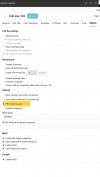
Go to the extension settings, under the options tab, and check PBX DELIVERS AUDIO for all extensions.

IMG_7036.jpeg
 
Theese 4 extensions are on the same network as the others. I had already thought about "PBX delivers audio", but none of the other extensions that are working correctly have the bit set either. And all 4 extensions have worked in the past. The is a resent issue. Just started a couple of weeks ago. I will try the PBX audio, and let you know.

??
 
Update

I changed the PBX Delivers Audio setting on the 4 extensions. Rebooted. and all is good.

As a test, I changed one of the extensions back (removed the check box) and the issue came back.

I am glad it is working, but I don't understand why it worked for awhile and quit working, and only these 4 extensions. Seems like it would be all or nothing.
 
Theese 4 extensions are on the same network as the others. I had already thought about "PBX delivers audio", but none of the other extensions that are working correctly have the bit set either. And all 4 extensions have worked in the past. The is a resent issue. Just started a couple of weeks ago. I will try the PBX audio, and let you know.

??

This can be explained if the phones are on different VLANs and the network administrator does not allow traffic between the VLANs.

or

Previously, internal calls were recorded, which forced PBX Delivers Audio even if it wasn't checked.
 
  • Like
Reactions: JohnS_3CX
OK, I have determined what the issue is. Your VLAN statement got me thinking.

We recently changed the internal subnet from 255.255.255.0 to 255.255.252.0. to expand the number of available IP addresses.

The phones that are DHCP got the new subnet automatically through DHCP. The phones that are static did not change. So the phones on the different subnets cannot talk each other, but the ones with the same subnet can. There are a couple of more phones that are DHCP, but they just have not noticed they cannot make internal calls.

Thanks for the help
Unconfused!!
 
I suspected it had something to do with them not being on the same network. Well, they were on the same network but not on the same subnet (mask).

Mystery solved!
 
Status
Not open for further replies.

Members Online Now

Forum statistics

Threads
111,831
Messages
589,277
Members
164,660
Latest member
RJenkinsROCK