Which port use to authenticate with 3CX?

Status
Not open for further replies.

Manos Val

SOHO User
Joined
Sep 1, 2017
Messages
32
Reaction score
3
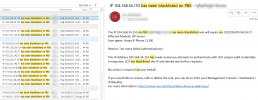
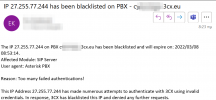
Last days I receive a lot of emails "IP xxx.xxx.xxx.xxx has been blacklisted on PBX. This IP Address xxx.xxx.xxx.xxx has made numerous attempts to authenticate with 3CX using invalid credentials. In response, 3CX has blacklisted this IP and denied any further requests."
Which ports are used by hackers to attack 3CX?
Can I block these ports temporally?

2022-03-05_08-23.png
 
Hi,

most of them try to connect to the sip port (5060 tcp + udp if not changed). If you don't use it by yourself then build a firewall rule to allow only connections from your voip provider ip / net (for telephony) and from 3CX (because of the firewall test).
 
  • Like
Reactions: bitn2 and AWS2P
Thank you fx-bastler for your advice.

I do not use direct voip on my 3CX from my phone provider. I use a Patton Analog VoIP Gateways (FXS) to connect my incoming analog lines to 3CX server. So, do I still need to ask my phone provider to send me their wan IPs?

What to you mean "from 3CX (because of the firewall test)."? You mean from 3CX company? Are these addresses somewhere on the internet or should I ask them?
 
I blocked 5060,5061 and 5090 but today I received an other email that 3CX has blocked an IP due to "numerous attempts to authenticate with 3CX using invalid credentials". Do I have to block UTP ports as well?

1646721145952.png
1646721206171.png
 
5060 is UDP & TCP, same for 5090, did you made a rule for both protocols?
 
so change your rule for both
 
5060 ist enough, 5090 is used for the mobile apps. if you block this port the apps doesnt work anymore.
 
I am also looking for some settings to stop external devices from registering with my PBXs... or, at least trying to. Since March 2nd, two of the three 3CX PBXs I monitor are getting hammered. I went from less than a dozen entries in the Blacklisted IPs to almost 2 pages. Their activity log (in verbose) shows a lot of repeat (already blacklisted or banned) IPs, and I still see roughly 7 or 8 unique IPs per day trying to authenticate as various IP phones or PBXs.

I haven't yet figured out what port(s) I can block without stopping my legitimate soft phones from remotely logging in. So, far they are just stand-alone PBXs... no bridges, SBCs, etc. I think I have cranked down the 3CX Security settings to "excessively anal", but I haven't found anything to thwart the attempts.

As an old security-oriented IT person, I prefer to not give *them* the opportunity. I am also still learning to secure these PBX units. I am hoping to find something I can do besides turning off notifications and ignoring these failed attempts. I don't want to leave a potential success route.

I am looking for a better hardening option, and I haven't been able to isolate the routers as a potential weakness. I am hoping someone can point out an obvious thing I am not recognizing.

For those curious about the routers in question:
. Two of the routers I am connected to are Cisco RV320s. They need to be replaced, but one of them have not be on the attack vector while they are on adjacent IP addresses. I think they are set the same, except the one getting hammered is a test unit and doesn't have 5060/5061 defined for a SIP provider.
. The third 3CX is on a Cisco RV160 and has assigned the SIP provider, and it is getting hammered just as badly as the RV320 mentioned. These units don't have VPN configured, but the one that is NOT getting hammered does.
. I am thinking about building up a pfSense+ device, but am currently resource restricted.

Thank you in advance for any helpful information to point me in the correct direction!
 
Just restrict your sip port to your provider.
 
Just restrict your sip port to your provider.
Interesting thing about that, bitn2...
. The RV320 attached test unit doesn't have port 5060 assigned toa SIP provider. It is actively blacklisting.
. The RV320 attached unit in production is failing Full Cone, and I used this RV320 to program the test RV320. No IPs are being blacklisted.
. The RV160 has an issue with adding port 5060 deny rules after SIP provider allow rules. So, I added rules to redirect to a dead IP, which I really don't like doing. It is not stopping the IPs being blacklisted. That is why I am looking at doing a pfSense+ FW when money allows.

I just saw the Full Cone test fail, and it looks like STUN may be disabled. I am not sure what I did to make that happen. If it is in the 3CX admin console, I would really like to learn how to consistently do that!

I am just not expert at this, yet. I am hoping these attack attempts are thwarted long enough for me to figure out what I am doing!
 
I don't know how your firewall is configured. Please be sure to do it like 3cx said. When you did everything right, there should be no problem. It's quite normal to have those attempts but 3cx should block everything. When you restrict your sip port to your provider than everything is ok.
 
  • Like
Reactions: Jim.Lloyd
Understood, bitn2. I am pretty sure it is my aging brain not quite catching on to something obvious. I am not liking the RV160 rules implementation, though. Sure would like to jump to pfSense+ sooner rather than later.

The first system I set up has been running for about 4 years, has upgraded from v15.5 to v18-sp2, and fails Full Cone for STUN. It also doesn't have an issue with all the blacklists happening... it has none. If I figure out how I did that, I might have something useful to replicate!

I hope 3CX can handle a long IP Blacklist set...
 
[ UPDATED 3 Hours Later ] - This is NOT the solution. I am down to the Cisco RV160 rules....

So, I changed the Public IP from 'Dynamic' to 'Static'... 'Dynamic' invokes STUN from the 3CX servers...?

Anyway, I am now only seeing a long list of banned IPs blacklisted by 3CX. 18 hours since I made the change, and I have not yet seem an IP phone or phone switch fail to long in. The weekend will be the test, but I thought I'd mention this for anyone interested.

I do have a dynamic IP from my ISP, but it only changes when the FW/Router MAC changes. As long as I manually update the 3CX and SIP provider when I change the HW, I should be fine.

FYI, and feel free to put words of wisdom in replies for me and anyone else who happens to chance upon this thread in future quest for knowledge!
 
Last edited:
[ Update ] The number of login attempts have dramatically dropped since I made the setting change from Dynamic to Static in the Public IP panel. I did not change IPs or switch to a real static IP, yet. What I almost immediately saw was the long list of IPs already banned by 3CX. In the 72 hours since I made that change, I have seen 5 actual blacklists from my PBX. I was seeing at least 8 per day, since March 2nd.

I can't tell if it is just a coincidence or if the setting change actually did something. It could be that 3CX has built up a mature current list to blacklist for us, or the perpetrators are thinning out. Or, setting your IP as Dynamic and leaving the 3CX STUN servers in place in the Public IP panel opens one up for advanced attack surface. I'd like to believe the latter is true, because that would validate the phrase, "Friends don't let friends use STUN!"

I hope this is helpful to someone else...

BTW: I still think there is something not quite right with how the Cisco RV160 handles Firewall Rules, and I am saving up my pennies to put together a pfSense+ appliance (or build my own to run it).
 
Status
Not open for further replies.

Forum statistics

Threads
111,974
Messages
590,083
Members
164,900
Latest member
Silent_Guru