Windows Softphone 5.1 BETA: Receptionists Set Call Forwarding Rules, Read & Reply Via Chat Notifications

ThomB_3CX

Staff member
Joined
Apr 28, 2022
Messages
829
Reaction score
1,256

Let Receptionists set call forwarding rules and read & reply via chat notification itself.​

The latest 3CX Windows Softphone 5.1 BETA lets your receptionist set call forwarding rules and introduces read & reply via the chat notification itself. There’s also updates on QR code provisioning - to connect 3CX mobile clients direct...
Continue reading the Original Blog Post.
 
Last edited by a moderator:
That's a major update!

Couple things for the next one:
- Click2Chat/SMS via "sms:" URL protocol.
- Chat messages templates support
- PLEASE: Copy/paste support for chat attachments, like in the Webclient.
 
Great stuff! Works fine.

For the next release, please make it possible to copy text from messages and not only the whole message. Maybe also make links clickable in messages.
 
We are missing QuickMeeting in the new stable 3CX Windows Softphone App.
Will Quick Meeting function be back in this beta?
 
That's a major update!

Couple things for the next one:
- Click2Chat/SMS via "sms:" URL protocol.
- Chat messages templates support
- PLEASE: Copy/paste support for chat attachments, like in the Webclient.
100% great additions, I never thought I needed, but now can't live without. :)

Definitely get a lot of heavy chat users requesting templates in app. I used to use these as well.
 
Wow! So good. Very useful. Good to have the set status back, and we like the new functions
 
  • Like
Reactions: N_G and Evolute IT
  • Like
Reactions: CallingFromMars
Hey Thomas, thanks for fixing the 2 bugs reported! Checked them with the beta version, and now the auto answer works great with the CRM data, and it also works great when the CRM data is pushed after the call arrives to the extension. Hope this is included in the production version soon!
 
@ThomB_3CX

Just received the below from a customer, I have not been able to test myself, but hope it will give you something for the next release version.

"The Windows runtime included in the 3CX installation v .664 and .751 are both older than the one in the Windows update, which is why it causes challenges with the 3CX Windows app after updating Windows.

Here you have to reinstall 3CX v .664 and .751 without the included runtime to fix the problem.

Unfortunately we are missing a newer version that is not in Beta"


Thank you
 
@jed thanks for this.

Might I ask if your customer is using the MS Store builds or the global MSIX?
 
  • Like
Reactions: ElenaF_3CX
Just downloaded the latest build 886 and the QR code is missing to provision mobile apps from the Beta - was there in 881. Anything we're missing here to get this back?
 
Just downloaded the latest build 886 and the QR code is missing to provision mobile apps from the Beta - was there in 881. Anything we're missing here to get this back?
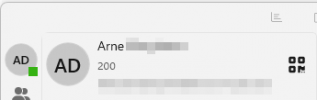
QR code is still there from what I can see on the latest update.
Go to settings and the QR is next to the name and extension

1748939575201.png
 
  • Like
Reactions: Evolute IT

Members Online Now

Forum statistics

Threads
111,834
Messages
589,287
Members
164,664
Latest member
dominik.pepel