Yealink Unable To Change External Ringer Fix

Status
Not open for further replies.

chance-wmt

Bronze Partner
Advanced Certified
Joined
Nov 23, 2020
Messages
96
Reaction score
30
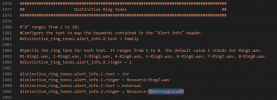
All 3CX needs to do is fix a line of code in their Yealink configs for us to have the ability to change both the internal and external ringtone. In my opinion it is more important to change the external ringtone than the internal ringtone to begin with.

Replace line,
XML:
distinctive_ring_tones.alert_info.2.ringer = Resource:Ring2.wav
with this,
XML:
distinctive_ring_tones.alert_info.2.ringer = Resource:%%defringtone%%
 
  • Like
Reactions: PD-SII
1618247081712.png
 
Here is the configuration, use at your own risk. However line 1991 should be the only edit. Tested working config. Now the option to change the ringtone under the admin panel will now work.
 

Attachments

Here is the configuration, use at your own risk. However line 1991 should be the only edit. Tested working config. Now the option to change the ringtone under the admin panel will now work.
It's line 1990 in our template.
 
  • Like
Reactions: chance-wmt
It's line 1990 in our template.
Make sure you are not using the old one, make sure it is version 109361 for T4X, I'm sure this works for the CP and T5X series too.
 
So that anyone reading this is aware, I just want to add that using custom templates or manually configuring IP Phones will void support for that specific configuration. However, in the event that support is required for the involved IP Phones, you can of course bring them to a 3CX supported state by factory resetting them and re-provisioning using the 3CX default template.
 
  • Like
Reactions: chance-wmt
Please where do you get the template version 109361 for T4X? My last version is 109356 (3CX 16.0.8.9).

Regards Martin
 
If you do not see the template update in the Management Console updates section(upper-right) it may be because you have not added a device that uses it yet or it may be that the devices you have added have been configured with a custom template. Try adding a new "dummy" device in the management console that uses that template and then check the updates section again.
 
  • Like
Reactions: chance-wmt
Also, try rebooting the instance
 
Thank you Chris_C.
The tip with the "dummy" device bring me up. All our T46S run with customer templates. Thats the reason why we not get the update. Solved!

Regards Martin
 
Status
Not open for further replies.

Members Online Now

Forum statistics

Threads
111,831
Messages
589,277
Members
164,660
Latest member
RJenkinsROCK