- Joined
- Apr 22, 2022
- Messages
- 33
- Reaction score
- 18
Hello,
I was trying to install the 3CX SBC on debian and downloaded it from the partner portal https://downloads-global.3cx.com/downloads/debian12iso/debian-amd64-netinst-3cx.iso
Tried also the link from the public KB, it's the same : https://www.3cx.com/docs/installation-sbc/
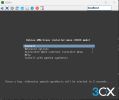
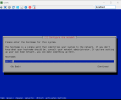
After creating the VM and begining the installation, it looks like the ISO is incorrect and is missing every 3CX steps, as well as network configuration. Also, it's a pure CLI driven wizard, and not a graphical TUI.
Can anyone else try it ?
Thanks !
I was trying to install the 3CX SBC on debian and downloaded it from the partner portal https://downloads-global.3cx.com/downloads/debian12iso/debian-amd64-netinst-3cx.iso
Tried also the link from the public KB, it's the same : https://www.3cx.com/docs/installation-sbc/
After creating the VM and begining the installation, it looks like the ISO is incorrect and is missing every 3CX steps, as well as network configuration. Also, it's a pure CLI driven wizard, and not a graphical TUI.
Can anyone else try it ?
Thanks !