V20 Update 10 Alpha: MCP, AI Server & More Admin Control

I connected 3CX MCP to an AI agent and asked it to check for security risks. It found several IPs attempting attacks that hadn’t been blacklisted yet, so I simply told it to block them.

Amazing — this is next-level PBX management!
 
Alejandro-

If i change the behavior for AI fallback and that works as expected. The call fails and goes to the specified extension.
It doesn't change the fact that its still failing on external calls. I changed sip trunk provider and added a new DID and am getting the same results. I will move this conversation to a support ticket as to not clog up this forum post.

Curious if you tested using an external call on your test agents?
Same issue here. Is it possible that this is the same issue as the one with the AI Agents integration in U8 Alpha that was caused by the system "language/locale" settings?
 
  • Like
Reactions: nikolascx
I connected 3CX MCP to an AI agent and asked it to check for security risks. It found several IPs attempting attacks that hadn’t been blacklisted yet, so I simply told it to block them.

Amazing — this is next-level PBX management!

Nice one!!!
BTW - they were not blacklisted yet because the IP's did not yet reach the blacklist threshold. But cool that you did it for the server.
Great example - keep on exploring.. There are 29 tools in the mcp toolbox catalog for you to explore!!
 
Hi there,

With the recent enforcement of the extension-creation limit tied to the maximum allowed, we were wondering if there are any plans to add a feature to the 3CX portal (portal.3cx.com) that shows which customers have exceeded this limit?

We don't use external monitoring tools for our servers, so at the moment we have to log in to each PBX individually to check whether any of them have gone over the limit. Having this information available directly in the portal would make things much easier for us (and other partners).

Thanks in advance for any updates you can share!
 
Same issue here. Is it possible that this is the same issue as the one with the AI Agents integration in U8 Alpha that was caused by the system "language/locale" settings?

What is the provider you have? We need to see the logs.
If you call the AI from a local extension does it work?
You can contact me on pm on this case - I'm reserving some time today for the community..
 
  • Like
Reactions: Alejandro_3CX
Hi there,

With the recent enforcement of the extension-creation limit tied to the maximum allowed, we were wondering if there are any plans to add a feature to the 3CX portal (portal.3cx.com) that shows which customers have exceeded this limit?

We don't use external monitoring tools for our servers, so at the moment we have to log in to each PBX individually to check whether any of them have gone over the limit. Having this information available directly in the portal would make things much easier for us (and other partners).

Thanks in advance for any updates you can share!

Good Question!
The team informed me that this information is visible.. So you should have it and then yes, you can contact the end user.
 
Hi there,

With the recent enforcement of the extension-creation limit tied to the maximum allowed, we were wondering if there are any plans to add a feature to the 3CX portal (portal.3cx.com) that shows which customers have exceeded this limit?

We don't use external monitoring tools for our servers, so at the moment we have to log in to each PBX individually to check whether any of them have gone over the limit. Having this information available directly in the portal would make things much easier for us (and other partners).

Thanks in advance for any updates you can share!
Hey @Voiceking.be
As @nikolascx mentioned we do currently generate a warning message if you try to place an order on an existing subscription that has exceeded the limit.

We are actually planning to bring this visibility directly into the subscription list so that you can proactively filter or find these subscriptions without having to attempt placing an order first.
 
Im falling behind with the AI side of 3CX having touched none of it. Whats best for me to do as a starting point? I dont want to be stuck at the port waving the ship of as it leaves xD
 
This is a massive step forward for 3CX.

Native MCP support, the standalone 3CX AI Server, programmable voice applications, and greater administrative control are not simply new features, they are transforming 3CX into a much more flexible and enterprise ready communications platform.

Instead of forcing customers to adapt their operations to a fixed system, these capabilities will allow us to build around their actual business requirements.

We are genuinely excited to start testing these features and developing new solutions for our clients.

Shukran to Nick and the entire 3CX team. Update 10 looks like a major milestone, and we cannot wait to see what we can build with it.
 
"We are actually planning to bring this visibility directly into the subscription list so that you can proactively filter or find these subscriptions without having to attempt placing an order first."

That would be great!
 
Hello,

Thank you for reintroducing support for Yealink Android phones.

However, it is unfortunate that the Yealink T88W Pro phones are still not supported. I hope they will be included in a future beta release.

Kind regards,
Alain
 
Im falling behind with the AI side of 3CX having touched none of it. Whats best for me to do as a starting point? I dont want to be stuck at the port waving the ship of as it leaves xD
Actually, the new MCP functionality is the simplest thing to get to grips with. 3 clicks (number of clicks may vary :P ) and you can start talking to your PBX.
 
Same issue here. Is it possible that this is the same issue as the one with the AI Agents integration in U8 Alpha that was caused by the system "language/locale" settings?
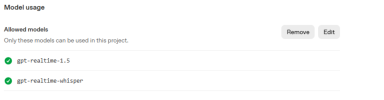
Ensure please you have the new models (gpt-realtime-2 or gpt-realtime-1.5 and gpt-realtime-whisper) allowed and not blocked on the Open AI platform.
 
Last edited:
Hi,


Very nice update. Can't wait to test the MCP features. You guys are killing it!

I have one question about the Caller ID selection. I read this is only for users that have multiple DDI's assigned to them. We have customers with muli-queue agents who need to change their caller ID depending on the departpment they use for that call. The DDI's are assigned to their queues and not the users themselves. It would be awsome if they could select Queue assigned DDI's as well. At this moment we use multiple outbound rules and prefixes to handle this.

Thanks.
 
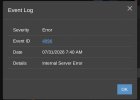
Getting this error when calling a DID linked to an AI agent (receptionist.) U10, standard prompt, no KBs. It just fails and reverts back to the normal IVR (my fallback destination.) Yes, models are authorized in OpenAI.
IMG_8318.jpeg
 
Getting this error when calling a DID linked to an AI agent (receptionist.) U10, standard prompt, no KBs. It just fails and reverts back to the normal IVR (my fallback destination.) Yes, models are authorized in OpenAI.
View attachment 52145
is this just with the external calls, right? what is the sip trunk? please check in this sip trunk that you are using only G711u (PCMU), G711a (PCMA), then make a new test.
 
  • Like
Reactions: N_G
is this just with the external calls, right? what is the sip trunk? please check in this sip trunk that you are using only G711u (PCMU), G711a (PCMA), then make a new test.
Even internal calls. It just plays MoH when calling from internal, it's trying to send the call back to me somehow, but none of the config tells it to do that.

SIP trunk is locked to PCMU ever since the first AI agents.
 
Even internal calls. It just plays MoH when calling from internal, it's trying to send the call back to me somehow, but none of the config tells it to do that.

SIP trunk is locked to PCMU ever since the first AI agents.
ok if it is not working for you even with internal calls, then please set verbose logging, restart the AI service, perform a test and check the 3cxai.log, you may open a support ticket for further troubleshooting.
 
  • Like
Reactions: N_G
Please ensure you have it
Getting this error when calling a DID linked to an AI agent (receptionist.) U10, standard prompt, no KBs. It just fails and reverts back to the normal IVR (my fallback destination.) Yes, models are authorized in OpenAI.
View attachment 52145

See comment above - ensure you have the following allowed models on the AI Project i,e gpt-realtime-1.5, gpt-realtime-2, gpt-realtime-whisper.

1785500127740.png
 
What is the provider you have? We need to see the logs.
If you call the AI from a local extension does it work?
You can contact me on pm on this case - I'm reserving some time today for the community..
I have some new info on this that may explain what the user above is experiencing as well.

I have now tested this on two seperate systems. Worked perfect on U9. Upgrade to U10 Alpha and it breaks. They both behave exactly the same. At first I thought this was for external calls only but what I have found in testing as that the AI agent will only answer from the internal extension for its boss. If I call internally from any other extension on the system its the same behavior as the external calls. Hang up / Fallback extension.

Error code 4096 "AI Bridge" 500 Server Internal Error
 
  • Like
Reactions: N_G and Evolute IT

Latest Posts

Members Online Now

Forum statistics

Threads
111,793
Messages
589,015
Members
164,585
Latest member
TCOOKE