16.7.0.31: Phone does not ring on incoming calls

Status
Not open for further replies.

nobody

Bronze Partner
Joined
Aug 15, 2017
Messages
500
Reaction score
57
I installed the update for the pbx to the latest version: 16.0.1078,
Installed the android version of the client.
Result: phone does not ring, regardless if app is in foreground or not.
I can make outgoing calls however.
Accept push is selected.
I tried reprovision phone, rebooted pbx server, rebooted phone. Still no incoming calls.
When I open the android app I see the call as missed.
Phone: sony XZ1 compact, OS: sony 47.2.A.11.228

followup: I reverted to a checkpoint before the pbx update. Phone does still not ring.
 
Last edited:
Hi there!

Could you first start by upgrading to the latest 3CX Service pack which is V16 Update 8?

Also, would you happen to have any other Android device to try with? This would be good to see if it is something specific with this device, or if more devices are affected.
 
Hi @nobody,
Also be sure to check this Knowledge Base post regarding troubleshooting and Google's requirements for FCM Push notifications.
 
Last edited by a moderator:
  • Like
Reactions: NickD_3CX
"3CX Service pack which is V16 Update 8": There is only one update availible which I installed. If you have a different download availible, please give me a link.

Once I installed the update for the pbx again, but kept the android app at version 16.6.2.89 phone still rings
I did a reprovision request: Stil ring
I did setup another Phone: Note8: version 16.6.2.89: rings
updated the Note8 to 16.7.0.31: rings
update the sony again to 16.7.0.31: now, it also rings

So, I did the same as yesterday (only with the addition that I added a new extension, unlikely that this will make a difference). This time it currently works as expected.

Strange, but unless the problem comes up again. ok.
 
Glad to hear that!

"3CX Service pack which is V16 Update 8": There is only one update availible which I installed. If you have a different download availible, please give me a link.
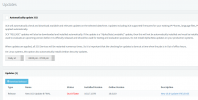
Exactly where you went to do the first upgrade as well:
1616074991744.png
 
My pbx looked the same as your screenshot, with only the 16.0.9 version available to install - which I did install, yesterday the same way as today.
But when I wrote the starting post in this topic instead of the 16.0.9 version I wrote the version number old version 16.0.1078. That was incorrect.
 
  • Like
Reactions: NickD_3CX
mhmhm,
today missed one call.
The FCM Diagnostics screen messages looks ok however for this event: received event and event was acked, however phone did not ring.
 
Hi!

So if I understand correctly, now the issue with incoming calls not ringing does not always happen, it happened only on 1 call so far?
Could you please confirm?

Also, could you confirm where the PBX is installed, is it on the customer premise, in some Hosting Provider, or hosted by 3CX?
 
Hi!

So if I understand correctly, now the issue with incoming calls not ringing does not always happen, it happened only on 1 call so far?
Could you please confirm?

Also, could you confirm where the PBX is installed, is it on the customer premise, in some Hosting Provider, or hosted by 3CX?
When I started this thread, the problem was permanent.
But since it fixed itself by redoing the update it works ok most of the time.
However, I began to monitor the phone more closely because I "felt" that it is not 100% reliable.
Now, today I had the first proof of phone not ringing. A second try of the caller one minute later worked ok.
Pbx is hosted by me on premise, phone was in the same L2 segment as the pbx and was using wifi.
I cannot tell for sure if phone was sleeping.
 
Ok, so we have some progress, this is good.
Could it be indeed that the Caller called you but didn't leave it ring long enough? You could potentially check this from the Call Reports to see how long it was ringing your Extension, so if it was less than e.g. 4 seconds, then this could happen.

One more precautionary things you could try is disabling IPv6 as we have sometimes seen this cause delay in delivery of PUSH messages.
 
Last edited by a moderator:
  • Like
Reactions: KyriakosP
@nobody to complement @NickD_3CX's advice, when a Push notification fails to reach the app, it usually means:

(a) The FCM service could not reach the device to deliver the notification, i.e. the device was either disconnected or in sleep / doze mode with no connectivity. This can be inferred from the 'Events' view in the FCM log by searching for failed connections or reconnections around the time of the missed Push notification.

(b) The FCM service reached the device but the app was not available, e.g. due to device battery management restrictions. For this you can lock the app in the recently used apps. Unfortunately we don't have your specific device to assist you more in this case.
 
Last edited by a moderator:
But: in the log of the FCM I can see the notification arrived and was acknowledged, It even looks like it was acknowledged by the 3CX app. Also, it worked perfect until I installed the beta (as far as I remember). But well, it also is possible that only because I am currently more cautious then normally I recognize a problem that was present in previous versions too.
And: Missing one in 1000 calls would not be a problem, but missing one in 50 calls would make the programm rather useless IMO.
I just wait an will monitor what happens.

BTW: I tried to copy and send me the FCM log, but the best I got was a screenshot. Copy and paste seems to be disabled. It there a way to save the log?
 
Unfortunately there is no way to export the events log directly from the FCM log app, apart from screenshot. If you manage to catch the issue, please PM me with the screenshot(s) to check that the Push notification was broadcasted OK to the app.
 
I ran the call report:
The ring time is reported as 0 seconds, and the comment translates to: "error when canceling"
 
I ran the call report:
The ring time is reported as 0 seconds, and the comment translates to: "error when canceling"
So this in fact may have been something else.

Despite this though, keep monitoring to see how it goes.
 
Status
Not open for further replies.

Members Online Now

Forum statistics

Threads
111,832
Messages
589,284
Members
164,662
Latest member
DejanMDS