Solved 365 Integration Hanging

Status
Not open for further replies.

lewiswil

Customer
Joined
Jun 25, 2018
Messages
12
Reaction score
6
Hi,
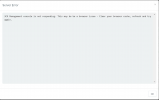
We have just set up 365 integration with our 3CX instance but trying to access the management page just hangs and then provides an error message of:
"3CX Management console is not responding. This may be be a browser issue - Clear your browser cache, refresh and try again."

Any ideas on how to resolve this
 
What version of 3CX are you using?
Is your HTTPS port open on your Firewall (default is 5001)?

Can you also send a screenshot of the error?

[EDIT]
Have you in fact checked if the error is correct? Try using another browser to do the same thing, preferably one that you don't use much and is 'cleaner'.
 
Hi Nick,
We are using 3CX V18 (18.0 update 1 Build 237)
HTTPS is open on port 443
This is the error, although all other pages within the management console still work fine
1639063269717.png


We have tried now in multiple browsers... is it possible this is a timeout due to our M365 tenancy having ~18K users in?
 
Hi Nick,
We are using 3CX V18 (18.0 update 1 Build 237)
HTTPS is open on port 443
This is the error, although all other pages within the management console still work fine
View attachment 26481


We have tried now in multiple browsers... is it possible this is a timeout due to our M365 tenancy having ~18K users in?
It could be, although what surprises me is that recently I tried this same thing with 25+K users and it loaded really fast.
Do me a favor, upgrade to V18 U2, and if it still does the same we'll check the logs together and try and see what we can do.
 
Hi @lewiswil , we updated from V16 to V18 U2 last night and have the same issue. Did you manage to resolve this?
 
Hi @lewiswil , we updated from V16 to V18 U2 last night and have the same issue. Did you manage to resolve this?
If you are V18 U2 (build 307) and have this issue, please do the following:
1. Switch 3CX Logging to "Off" from Dashboard --> Activity Log --> Settings
2. In the Dashboard --> Activity Log press "Purge" to delete the current logs
3. Go back to Dashboard --> Activity Log --> Settings and enable "Verbose"
4. Replicate the issue by going to Settings --> Microsoft 365 and wait until the error appears
5. If the issue happens, generate the Support Info from the Management Console, top-right corner select Support, then press Generate Support Info
6. From the admin email inbox, check your mail and download file
7. Upload it to a filesharing service of your choice like GDrive, WeTransfer, etc, and send me the download link in a PM.
8. Also tell me the approximate time you did this test.
 
If you are V18 U2 (build 307) and have this issue, please do the following:
1. Switch 3CX Logging to "Off" from Dashboard --> Activity Log --> Settings
2. In the Dashboard --> Activity Log press "Purge" to delete the current logs
3. Go back to Dashboard --> Activity Log --> Settings and enable "Verbose"
4. Replicate the issue by going to Settings --> Microsoft 365 and wait until the error appears
5. If the issue happens, generate the Support Info from the Management Console, top-right corner select Support, then press Generate Support Info
6. From the admin email inbox, check your mail and download file
7. Upload it to a filesharing service of your choice like GDrive, WeTransfer, etc, and send me the download link in a PM.
8. Also tell me the approximate time you did this test.
Thanks @NickD_3CX, sent you a PM with the support info.
 
Hi @NickD_3CX. I have just sent the support Information for a test at roughly 10:49 GMT today.

@Smokebomb no luck getting this resolved yet
 
@Smokebomb @lewiswil
Thanks for the files, I have gone over them and we will go over them with our Dev Team.

I'll update this thread once we have an update.
 
  • Like
Reactions: lewiswil
Dear @NickD_3CX ,

We are also facing the same issue. Customer having 30+K users in O365 and getting "3CX Management console is not responding. This may be a browser issue - Clear your browser cache, refresh and try again." message when enabling the integration.
 
We have a same problem. 6k users
 
Hi @NickD_3CX, is there any update on this issue? This is currently the only factor preventing us from migrating the remained of our users into our 3CX instance
 
Improvements in this area have been completed and will be included in V18 U3.
Currently I don't have an ETA as to when it will be released, but things are starting to be wrapped up to enter the QA testing phase.
 
FYI update 3 fixed this issue for us - thanks team!
 
  • Like
Reactions: NickD_3CX
Thank you very much for the feedback @Smokebomb !

I will mark this as 'Solved'.
 
Status
Not open for further replies.