365 SSO not working. MS Button is present but does not log the user in.

prb1412

Premier Customer
Joined
Feb 8, 2023
Messages
44
Reaction score
5
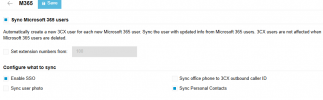
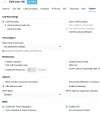
After upgrading to V20, the MS logon button is present. When you select it, the screen refreshes and redisplays, but no logon. I have removed the app from 365, and rebuilt it using the new integrated registration. No change. Turned off Users - M365 Sync, and removed the SSO option from my test user. The rebuilt the app again, enabled M365, and SSO in the user. No change.

Any help would be great, we rely on this feature.
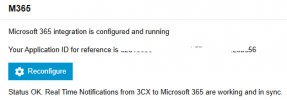
365 integration.png

m365.png
3cx user sso.png
 
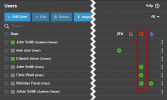
Is the user synced from M365? It will have to be a synced user in order to use the integration capabilities.

1743168701376.png
 
Check their IP isnt blacklisted.
 
It is not. The first time you attempt to log on with the MS button, you are taken the MS login page. It accepts my credentials, and verifies me via MFA, then returns to the client logon page. Subsequent logon attempts are cached and do not prompt for authentication. If I open a private window, or new browser I an authenticate again. Tried on multiple systems, and different networks.
 
I also had the same problem as OP, what I ended up finding to be the solution for me was to go through each user in my system and edit their settings > options > ms365 and toggling SSO on even though I enabled the global configuration at the Integration level. I'm not sure if this has to be manually toggled for each extension you create, you it looks like you have to at least go in and turn this on for any existing extensions that you migrate up to v20 or pre-date you enabling the SSO integration.