3CX and Fanvil U3X DSCP problems

Status
Not open for further replies.

leogrande

New User
Joined
Sep 29, 2011
Messages
8
Reaction score
1
I am not sure that this problem is caused by 3CX phone provisioning, but need to rule out this possibility.

Found this in the provisioning config file:


Code:
<QOS_CONFIG_MODULE>


<EnableVLAN>0</EnableVLAN>

<VLANID>256</VLANID>

<SignallingPriority>0</SignallingPriority>

<VoicePriority>0</VoicePriority>

<EnablePVID>1</EnablePVID>

<PVIDValue>254</PVIDValue>

<LLDPTransmit>1</LLDPTransmit>

<LLDPRefreshTime>60</LLDPRefreshTime>


<LAN_Port_Priority>0</LAN_Port_Priority>

<Enable_diffServ>0</Enable_diffServ>

<LLDP_Learn_Policy>1</LLDP_Learn_Policy>

<LLDPLearnPolicy>1</LLDPLearnPolicy>

<Singalling_DSCP>-1</Singalling_DSCP>

<VLAN_Recv_Check>1</VLAN_Recv_Check>

<CDP_Enabled>0</CDP_Enabled>

<CDPEnable>0</CDPEnable>

</QOS_CONFIG_MODULE>

The problem, that I encountered with the Fanvil X3U, is the following:

When I enable DSCP and set Audio DSCP to 46, Signal DSCP to 24, the Audio DSCP will not change from CS0 to EF (46) (RTP), but Signal DSCP reflects new settings and it is CS3 (24) (SIP) in the packet capture output.

Tried with VLAN and non-VLAN configuration - no difference.

I am just asking: Are there any hidden settings in the X3U phone provisioning that can affect Voice? I do not think so but just need to verify it with 3CX.

Thanks.
 
Hi Leo,


If I'm not mistaken <Singalling_DSCP>-1</Singalling_DSCP> just disables it. But If you enable it and it does not behave as expected, it might be better to hit up Fanvil directly and get feedback from them.
 
Hi John,

I do not know what <Singalling_DSCP>-1</Singalling_DSCP> means.

You say it disables DSCP. The phone has Enable DSCP, Audio DSCP and Signal DSCP (this is a VOIP standard).

I think that <Enable_diffServ>0</Enable_diffServ> disables DSCP.

There are no any code line that sets Audio DSCP to anything in the configuration file.

So that <Singalling_DSCP>-1 is a bit confusing.

Yes, I have contacted Fanvil support and they claim that in their test environment DSCP works (Audio DSCP and Signal DSCP).

I do not have any other IP Phones currently, but expecting Yealink very soon.
 
That feedback is certainly interesting. Unfortunately this is not something that we test so I won't be able to offer much help on it, but if you get any further news from Fanvil feel free to share it on this thread in case others come across it.
 
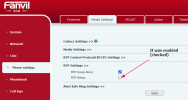
Fanvil support found the reason of DSCP not being changed for Audio (RTP):

1680263241705.png

I found that this setting has been applied by the 3CX phone provisioning template 'fanvil.ph.xml':

<MM_CONFIG_MODULE>
<RTP_Keep_Alive>1</RTP_Keep_Alive>
<RTP_Relay>1</RTP_Relay>
<PHONE_CONFIG>
<PHONE_CONFIG_Entry>
<Video_Codec_Sets>H264</Video_Codec_Sets>
</PHONE_CONFIG_Entry>
</PHONE_CONFIG>
</MM_CONFIG_MODULE>

RTP Relay = 1 breaks QoS Audio DSCP settings.
With RTP Relay disabled RTP now has EF (46) DSCP as expected.

With my subscription I can't do anything with this template. My trial, I believe Pro version, is still active, but 3CX doesn't allow me to change anything.
 
  • Like
Reactions: jed
Hi Leo,

If I may ask, are you turning towards DSCP for QoS reasons?

Do you currently face some issues with audio that you are hoping to solve with DSCP?
 
Hi John,

I am not a VoIP guru but what I have learned is that QoS DSCP marking is recommended to be done closest to the source of traffic, in this case an IP phone supports it. It could be done on the switch as well only if the switch supports dscp marking.

For the small environment with sufficient bandwidth not having QoS for voice is probably not an issue, but for larger ones it definitely can be a problem.
Again, I am not a network or VoIP guru, but believe that having QoS is a big plus.

Why 3CX doesn't leave the choice on RTP Relay setting to the end users?

I will test Yealink phone and let you know if QoS works with yealink 3cx template, at least I didn't find anything in that template that sets relay explicitly.
 
Last edited:
I will address that and a couple of other things too:

a) The why is rather simple: Fanvil has produced, tested and certified the template+firmware for 3CX the way you see it now. This is a known stable config which works well. Changing general settings with the potential to affect everyone using a Fanvil phone on 3CX is not going to be high up on our priority list to put it mildly. Customers with their own dedicated systems have the flexibility to do so at their own risk of course, we won't prevent you from doing it even if we strongly recommend against it.

b) The reason I asked you above is that if you start changing things to improve something by deploying DSCP that is currently not an issue, you might actually end up causing other unforeseen behavior in the devices that would not come up in the regular testing and certification Fanvil does with 3CX, and that's something we won't be able to help with. The unfortunate reality is that small embedded devices like IP phones can and do have issues from time to time and they might not show up until later after you've invested your time in deploying them with DSCP. At that point, it's not as easy as getting a Windows update patch or tweak, you will be at the manufacturers mercy to address it in the firmware.

c) However if you have some other method of prioritizing traffic that does not involve touching the phone config, then go for it. Let the phones be unaware of this, and prioritize your specific LAN ports, or IPs or MAC addresses, whichever method you have available. Preferably do it if you are actually having problems, otherwise run the phones as is and see if you are happy with them without going down any rabbit holes

And even if you were a VoIP guru, why would you create extra work for yourself at the end of the day? I would say keep it as simple and reliable as you can :)

Weigh the pros and cons and decide if it's worth it, armed with the knowledge above. I hope this is helpful to you and puts things into perspective!
 
It sounds more like a psychotherapy session :) . This phone is connected to the Fortinet FortiSwitch with QoS (queueing) which relies only either on CoS or DSCP. If it was connected directly to the router (in my case, FortiGate) it would be possible to rely on any other options for the traffic prioritization, but in my case and in the most cases, phones are connected to the switch.
 
Status
Not open for further replies.

Members Online Now

Forum statistics

Threads
111,835
Messages
589,289
Members
164,666
Latest member
infinititravels