3cx App is not receiving call

Status
Not open for further replies.

Farkhad1597

Free User
Joined
Jul 29, 2021
Messages
29
Reaction score
2
Hello
We have 2 extensions provisioned on android, both extensions are active but we cant make a call between each other.. i mean when i dial other side it show that talking state but he is not receiving any call
The same thins is from web client, but we can dial other extensions on network which is associated with pyshical phone
 
- PBX version (as in dashboard)
- Android client version
- Does a call to *777 working OK?
 
- PBX version (as in dashboard)
- Android client version
- Does a call to *777 working OK?
I have android 10 i think my phone is oneplus.. i tried to call *777 but it doesnt work as well
 
- PBX version (as in dashboard)
- Android client version
- Does a call to *777 working OK?
what should i hear when i call *777 ?
i hear myself
 
what should i hear when i call *777 ?
i hear myself
That is correct, *777 is a test extension where you talk and you hear your voice. So, that works.

Just to make sure that we understand the problem you are facing, is it that, no incoming calls to your Android Extension make the Android ring, so you cannot answer any calls?

So, when you call from a WebClient, to your Android Extension, the Android doesn't ring, right?
What happens when you call from your Android, to your WebClient extension. Does that work?
 
That is correct, *777 is a test extension where you talk and you hear your voice. So, that works.

Just to make sure that we understand the problem you are facing, is it that, no incoming calls to your Android Extension make the Android ring, so you cannot answer any calls?

So, when you call from a WebClient, to your Android Extension, the Android doesn't ring, right?
What happens when you call from your Android, to your WebClient extension. Does that work?
I tested it, and i cant make a call from web client to 3cx app as well..
 
I tested it, and i cant make a call from web client to 3cx app as well..
OK, so the issue seems to be that no incoming calls arrive to your Android Device.

First of all, make sure that your 3CX Server is on the latest version which is 18.0.2.237 (V18 Update 2).
Also make sure that you have installed the Android App version v18.0.3.17.

Once you have made sure you have done this, please try the following:
  1. Open the Android App
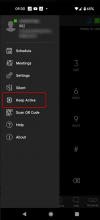
  2. Go to the Menu and press the "Keep Alive" option
  3. In the prompt, press "Yes"
  4. Try making a call from your WebClient again
1637739099299.png

Tell me if this works or not. If it does, it means that the issue is with PUSH.
 
Status
Not open for further replies.

Members Online Now

Forum statistics

Threads
111,832
Messages
589,278
Members
164,662
Latest member
DejanMDS