3cx+bitrix24 integration.

klisha

Customer
Joined
Apr 25, 2019
Messages
5
Reaction score
0
Where does 3cx store logs of interaction with CRM?
 
This will need to check the system service log file but first you need to set the PBX in verbose logging level.
 
The 3cxSystemService.log is where most of the information is. For chat interactions, you will also need to check the 3cxManagementConsole.log file. Ensure that verbose logs are enabled for the PBX, otherwise there will not be much information.
 
  • Like
Reactions: Evolute IT
Thanks!

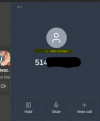
One more question. The integration instructions say that you can choose to create a Lead in CRM. I checked all the boxes as written in the instructions. I see an appeal to Bitrix in the logs. However, the Lead is not being created. I read somewhere on the Internet that you need to manually click the "create lead" button in the 3cx web application, but I don't have such a button. Or did I get it all wrong?
 
Thanks!

One more question. The integration instructions say that you can choose to create a Lead in CRM. I checked all the boxes as written in the instructions. I see an appeal to Bitrix in the logs. However, the Lead is not being created. I read somewhere on the Internet that you need to manually click the "create lead" button in the 3cx web application, but I don't have such a button. Or did I get it all wrong?
1774371287846.png
 
What if I'm not taking a call on a softphone? it's just that when accepting a call on a SIP-DECT handset, this window immediately closes and it turns out that it is impossible to create a Lead.
 
What if I'm not taking a call on a softphone? it's just that when accepting a call on a SIP-DECT handset, this window immediately closes and it turns out that it is impossible to create a Lead.
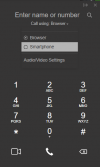
Have you tried configuring the Web Client to call using smartphone?
1774441693763.png

I'm not sure if this will work with desk phones, but worth a try. The idea of that setting is that you will be able to see and manage the call, but you handle it from a different device.
 
Thanks!

One more question.

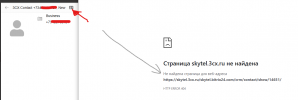
When you click on the "contact card in CRM" button, the page does not open, the link under this button:https://<my_company>.3cx.ru/<my_company>.bitrix24.com/crm/contact/show/85/Apparently, the problem is in this link. but I can't figure out where in the settings it is defined or edited.
 
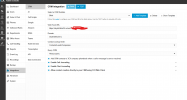
Looks like a wrong value configured for the Domain in the Bitrix integration in the 3CX console...
 
  • Like
Reactions: Evolute IT
bitrix-crm.png


bitrix-crm2.png

in the settings, the domain is specified as in the instructions. However, the link shows the content bitrix24.com
 

Forum statistics

Threads
111,986
Messages
590,148
Members
164,917
Latest member
Oliver Hastedt