• We do not provide troubleshooting help for unsupported phones. Please try with a supported phone.
  • V20 Update 10 Alpha Learn more

Solved 3CX changes Admin password on Polycom SoundStation IP 6000

Status
Not open for further replies.

dougswam

New User
Joined
Mar 3, 2022
Messages
2
Reaction score
1
Provisioning a Polycom SoundStation IP 6000 changes the phone's Admin password, making the Advance Settings unavailable. Only a factory reset returns the password to 456 and makes those settings once again available but leaves the phone unprovisioned. Where in the 3CX configuration can that password update be disabled or specified? I found a discussion earlier that stated it was in the Provisioning tab but I haven't been able to find it.
 
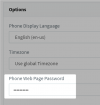
The password is in the "Phone Web Page Password" field on a phone, on that tab. You can log in to a phone with that. (click the eye on the far right to see it) 3CX sets a random one when provisioning a phone.

As to whether those settings are available, or hidden by the 3CX phone template, or what, I can't answer that.
 
  • Like
Reactions: dougswam
Hi Doug,

As mentioned above, this can be seen / modified under your extension's settings

1646384870847.png
 
  • Like
Reactions: dougswam
The password is in the "Phone Web Page Password" field on a phone, on that tab. You can log in to a phone with that. (click the eye on the far right to see it) 3CX sets a random one when provisioning a phone.

As to whether those settings are available, or hidden by the 3CX phone template, or what, I can't answer that.
"3CX sets a random one when provisioning a phone" - yep. That. I was able to set the password and reprovision the phone. Admin access restored. Thanks SteveITS.
 
  • Like
Reactions: JohnS_3CX
Hi @dougswam,

Glad to hear you've managed to resolve this, if you require anything else feel free to open a new thread.
 
Status
Not open for further replies.

Members Online Now

Forum statistics

Threads
111,831
Messages
589,277
Members
164,660
Latest member
RJenkinsROCK