3CX Chat to a Ring Group, All Other Calls to Digital Receptionist

Status
Not open for further replies.

ZippyRainbow

Customer
Joined
Jan 10, 2024
Messages
5
Reaction score
2
Brand new to 3CX. I have got a SMB 10 License, and hosted via 3CX. Version 18.0 Update 9 (Build 20)

I would like to be able to setup 2 routes:
1. For all calls via a DID Number, I would like these to got to the Digital Receptionist
2. For all 3CX Talk calls/chat I would like this to go to a Ring Group or Queue.

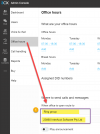
From what it looks like, the option under Settings > Office Hours > "Where to Send Calls and Messages" must be set to a Ring Group or Queue for the 3CX Talk to work via the Website/Wordpress. There doesn't seem to be a way to get around this.

I have tried to directly connect my external numbers (DID) to link directly to the Digital Receptionist but that change anything and the calls to these DID Numbers still just go to the Call Group set on the Office Hours Page.

Any help on how or if this can be done would be great. Thanks.
 
Hi Zippy!

You could set the default endpoint for calls and messages to the desired Ring Group or Queue and then use an Inbound Rule for the DIDs to direct them elsewhere.

If you have multiple numbers, are they coming from the same trunk?
Try calling from one of the other DID numbers and look at active calls (https:// {INSTANCEURL} /#/app/system_status/active_calls) to see which DID/trunk 3CX is receiving the call to.

If it shows a different number/trunk than you were expecting it is likely you need to use DID rules rather than add each as a separate trunk as 3CX will see these calls come in the first trunk as that is how the upstream provider is delivering these calls.

I hope this helps! (my first post here too!)
 
Thanks @Haydius, but I am pretty sure I have tried that without any success.

Yes, I have 1 trunk which the 2 DID numbers are coming in from... I would actually like one number to go to myself and the other to the Digital Receptionist(23863), but if this can't be done then both going to the Receptionist would be fine.

E.g.
1. Set "Where to Send Calls and Messages" (which I assume is the Default End Point you are talking about to "Main: Ring Group. (23860)
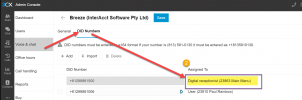
2. Set DIDs to point to the particular Digital Receptionist (23863) I want to direct external calls to.

Then if I call my main number 99861500 it just directs to the "Main Ring Group" (23860) not the Digital Receptionist (23863) which is where I would have hoped it to go. But on the plus side, the 3CX Chat then does work, as it has a Ring Group in the Default EndPoint.

1705286830303.png

1705287017153.png
 
I'll definitely need to have a play and learn more :P I'm a bit more versed in the self-hosted version where the admin interface is independent of the web client. Didn't realise how much like Self-Hosted V20 the 3CX-hosted interface looks!
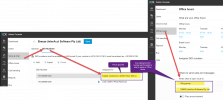
My testing so far:

I spun up a 3CX-hosted demo and configured the following:

Voice & Chat
- 3CX Live Chat - Ring Group 1
- SIP Trunk
-- Main Trunk -> Digital Receptionist
-- Extra DID 1 -> Ring Group
-- Extra DID 2 -> Queue

Office Hours -> Ring Group

Under Office Hours I have no assigned DID number - I assigned the DIDs in the Call Handling menu as per above.

I hope you are able to achieve your goal behaviours
 
Hi @Haydius ,

So it looks like you have setup your system the same as mine.

If I call anyone of my DIDs, it just will go to whatever is setup under Office Hours and "Where to Send Calls and Messages".

The endpoint assigned setup under the Trunk/DIDs doesn't look like it does anything useful.

1705290379651.png
 
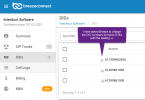
I believe your issue is that the inbound number format does not match what Breeze is sending to you. Please contact Breeze and ask them to switch the called number format to E164 (with the leading +).
 
  • Like
Reactions: ZippyRainbow
Hi @YiannisH_3CX ,
Yes, this might be the case. I can login to Breeze and it does look like the DIDs are setup without the "+" symbol at the front. I have asked them to adjust and I will see if this fixes my issue.
1705349104070.png
 
Hi @YiannisH_3CX & @Haydius,
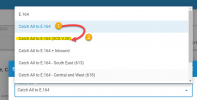
You were right YiannisH, it was a setting that needed to be changed with Breeze Connect, it looks like they needed a different setting for Version 20 of 3CX for it to work.

All is working as expected now.

1705382065893.png
 
Status
Not open for further replies.

Members Online Now

No members online now.

Forum statistics

Threads
111,831
Messages
589,277
Members
164,660
Latest member
RJenkinsROCK