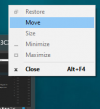
That's really weird. Try uninstalling and go to AppData and ProgramData and delete any 3CX folders. Then, reinstall. (This should clear any pre-existing config.)Tried reinstalling, the process is still running in the background. The icon is clickable, the app is running in the background, but there are no visible Windows and icons in the Taskbar and hidden icons in the system tray.
Hi, did you got a fix to this, someone on french forum describe same behavior as you got, they are on W10 V20H2 desktop ComputersI have already done this, but the issue still persists.
Haven't seen that yet with 3CX but have with plenty of other apps over the years, like Word. A general way to fix that for Windows programs is to either:app was basically off the visible window area

Founded in 2005, when VoIP was an emerging technology, 3CX has gone on to establish itself as a global leader in business communications.