


- Joined
- Dec 17, 2020
- Messages
- 21
- Reaction score
- 1
Hi. I've looked all the way back up to july posts, but can't find anything related, yet I can't believe no-one is having this issue. Either that, or we are missing something trivial but crucial.
We and our customers use RDS environments. Mapping audio through RDS works, but there will be annoying delays. For that reason we always used either the Chrome extension within RDS sessions (my god we miss that...) or we installed the 3CX Phone V16 locally, and access it from the RDS session with either the Chrome extension or in V18 just the webinterface:
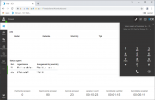
This is a screenshot from the webinterface where the LOCALLY running 3CX app V16 is selected as 'output device' (CTI?) and that works perfectly.
However, when I use the V18 3CX Desktop App, it doesn't register as such. Probably it registeres under 'Browser' as this uses the Electron framework. If that's the case, it correlates to a previous thread of mine at https://www.3cx.com/community/threa...-to-select-the-correct-one.78563/#post-360823, which I never got a proper answer or solution on. Browser is already registered because of we logged in to the webgui in the first place, so the second 'browser' is nowhere to be found.
Anyway, with V18 installed, this is what we see:
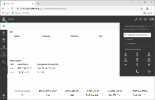
The desktop app is nowhere to be found. How to get this to work? How do other RDS or Citrix users work with this? We can't be the only one?
[offtopic]
Apart from that, while I like the V18 app GUI over the V16 one, I really don't understand the move to Electron. It's probably more cost effective to develop for multiple OS'es, but just like Teams and other Electron apps, 3CX got way more resource intensive.
Also, we're not (without any hacks that is) able to install the app in program files anymore, like a proper Win32 app should. In stead, in stead this became one of those dreaded apps that install in appdata\local, which just hogs the user profiles. Imagine you have 20.000 users all requiring at least 250MB of additional space in their profile opposed to just a proper 'program files' installation with only the config in the users profile. Let alone if you use old-skool roaming profiles for simplicity reasons. Why?
We and our customers use RDS environments. Mapping audio through RDS works, but there will be annoying delays. For that reason we always used either the Chrome extension within RDS sessions (my god we miss that...) or we installed the 3CX Phone V16 locally, and access it from the RDS session with either the Chrome extension or in V18 just the webinterface:
This is a screenshot from the webinterface where the LOCALLY running 3CX app V16 is selected as 'output device' (CTI?) and that works perfectly.
However, when I use the V18 3CX Desktop App, it doesn't register as such. Probably it registeres under 'Browser' as this uses the Electron framework. If that's the case, it correlates to a previous thread of mine at https://www.3cx.com/community/threa...-to-select-the-correct-one.78563/#post-360823, which I never got a proper answer or solution on. Browser is already registered because of we logged in to the webgui in the first place, so the second 'browser' is nowhere to be found.
Anyway, with V18 installed, this is what we see:
The desktop app is nowhere to be found. How to get this to work? How do other RDS or Citrix users work with this? We can't be the only one?
[offtopic]
Apart from that, while I like the V18 app GUI over the V16 one, I really don't understand the move to Electron. It's probably more cost effective to develop for multiple OS'es, but just like Teams and other Electron apps, 3CX got way more resource intensive.
Also, we're not (without any hacks that is) able to install the app in program files anymore, like a proper Win32 app should. In stead, in stead this became one of those dreaded apps that install in appdata\local, which just hogs the user profiles. Imagine you have 20.000 users all requiring at least 250MB of additional space in their profile opposed to just a proper 'program files' installation with only the config in the users profile. Let alone if you use old-skool roaming profiles for simplicity reasons. Why?


