3cx extension mobile forwarding and caller id display issues

EthanTurner

Silver Partner
Joined
Jan 17, 2024
Messages
7
Reaction score
5
We have a call queue with 2 DDIs that can be called and will go to 4 extensions in this queue:

1 user has the 3cx windows app and 1 user has a fanvil phone this shows the phone number of the person calling either as a number or as the name saved in the 3cx contacts, it also shows the call queue and DDI name and number which is successful and is working fine.

But we have 2 users extensions that is set to ring the mobile as well in the call forwarding settings of their extensions and when it goes through to them this only shows as 1 of the main DDI numbers in that queue and no details on who's calling in whether they are added in the 3cx contacts or not.

Is there a setting with our version, 20.0.2.715 or in the new version 20.0.3.806 that will pull the details you get from 3cx and not when it calls the mobile numbers?
 
So actually you receive a GSM call and not a call to the 3CX Client.
 
Hi Yes thats correct it goes through to the mobile number it doesnt show any details of whos calling should it show this or should it only show the DDI of what is being rang and thats whats being forwarded to the mobile?
 
This is a normal outbound call from the sip trunk to the mobile number.
It is expected to see only the sip trunk number and not from where this was originated.
 
  • Like
Reactions: EthanTurner
When a call is forwarded to the PSTN, the control of the Caller ID falls solely on the provider.

Essentially

Caller ID passthrough can be sent by 3CX. The SIP field entry for sending the Original Caller's ID is "OriginatorCallerId"

However, it is solely and entirely up to the provider to accept this.

Many providers do not allow you to send a caller ID that is not assigned to your account to prevent spoofing, and/or fraud attempts.

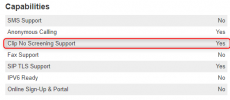
What may happen if a "foreign" caller ID is sent to a provider that does not allow CLIP No screening:

1. Reject the call outright
2. Send the call out with "Anonymous" as the Caller ID
3. Send the call out with a random Caller ID from their pool (This may even be a number from a different country)
4. Send out your main account number (usually your main trunk number) as the Caller ID.

Generally, if you have any caller ID issues, please contact your SIP Provider.

--------------------------------------------------

You can easily see this in a wireshark capture, where you can see the original caller ID is being passed through to the provider. If you see the office number it means that the provider is ignoring what the PBX sends.

If it is a supported provider of 3CX, you can see if the provider supports this functionality from our website: https://www.3cx.com/partners/sip-trunks/

1729072242037.png
 
Hi,

Thanks for this, instead of it calling the mobile i looked to move the user to use the ios 3cx app but this is not calling the 3cx app. I've reprovisioned it on the users device, i reprovisioned it on mine and it was successful but the user isnt getting any calls, we are both on IOS 17, i know there has been reports of issues with ios 18 but we arent on this, all notifications in settings are the same and both versions of the 3cx app is the same on 20.0.7.184
 

Forum statistics

Threads
111,955
Messages
589,925
Members
164,853
Latest member
as7h