3CX Extensions Are Disabling Themselves

nate farley

Basic Certified
Joined
Apr 10, 2025
Messages
4
Reaction score
0
Our 3cx extensions are disabling themselves and we have no idea why this is happening. This is impacting our campus police department. This is a high priority issue and needs to be resolve asap. Are there any reasons why this could be happening?

Note: In our Event and Audit Logs we see errors about disabled extensions attempting to make calls.

Any help with this matter would greatly be appreciated.
 
When you say disabling themselves, can you elaborate more? I'm guessing you mean the extensions are un-registering which means the calls wont go through to the device?

How are they provisioned? Behind SBC or Router Phones? and what devices are they?
 
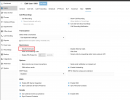
So, the extensions aren't necessarily getting unregistered. They're just being disabled. See picture. In the Users tab, under Options, the option highlighted was actually checked. We did not check it. It automatically checked itself. To answer your next questions, some of the extensions are on a physical Yealink phone and some are not. The ones that aren't on a physical phone are "soft" or "virtual" numbers. The phones and extensions are periodically reprovisioned.

1746805482583.png
 
Is it being Cleared by a Receptionist role? (which would delete all details)

Do you have any sort of sync running, like M365?

Check the Audit Log in the dashboard.
 
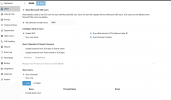
The extensions that are automatically being disabled do not have a Receptionist role and yes, we're sync with M365.
1746815065205.png
 
I meant, is someone who is a Receptionist (or higher) clicking Clear on that extension. If the name and everything else doesn't remove that's probably not it.

I'd guess it's more likely the sync. Is there something specific to those users in 365?
 
What we believe that's happening is that those extensions that were getting disabled, were not in M365. So, when 3CX looked for those extensions and didn't see them in M365, 3CX disabled those extensions. I don't have a complete list of all the extensions that got disabled but the ones that I did look at seemed to be department main lines, which most have a unique email address associated with their extension and are not found in M365. We're in the middle of adding users to the Sync Users section of the previously shared picture, clicking "sync only", and unchecking the "set extension numbers from:" option in the Sync Microsoft 365 Users section found at the top of the previously shared picture.
 

Members Online Now

No members online now.

Forum statistics

Threads
111,831
Messages
589,277
Members
164,660
Latest member
RJenkinsROCK