Solved 3CX failed to establish a TCP connection to activation.3cx.com. Ensure that the local or border firewalls are configured to allow outbound traffic to

Status
Not open for further replies.

jorgemichel

Free User
Joined
Aug 12, 2019
Messages
20
Reaction score
4
Holla guys,
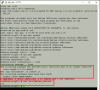
I work in a company where we use 3cx with virtual pbx a lot where there is the client where his license expired we did the renewal and always got this error “3CX failed to establish a TCP connection to activation.3cx.com. Ensure that local or border firewalls are configured to allow outbound traffic to activation.3cx.com ”. It is installed on Debian already tried to do the apt-get update and apt-get upgrade command but is requesting the removal of 3cx as you can see in the image in the attachment. We currently have version 15.5.13103.5. Help me please…
 

Attachments

  • 3cx failed activation3.png
    3cx failed activation3.png
    74.2 KB · Views: 49
Last edited:
The version it is running is 15.5.13101.5
 
root@cvb-voip01:/etc# apt-get upgrade
Reading package lists... Done
Building dependency tree
Reading state information... Done
Calculating upgrade... Done
The following package was automatically installed and is no longer required:
linux-image-4.9.0-6-amd64
Use 'apt autoremove' to remove it.
The following packages have been kept back:
3cxpbx linux-image-amd64
0 upgraded, 0 newly installed, 0 to remove and 2 not upgraded.


Not upgraded..
 
You need to be on V15.5 SP6 and higher to be able to contact the activation server due to a certificate change.

I believe that the following should help:

First run
Bash:
apt-get update

and then
Bash:
apt-get install 3cxpbx=15.5.15060.6
 
  • Like
Reactions: AWS2P
surely it will :)
 
Hello @jorgemichel

For future reference please not to post sensitive data on the forum like licence keys and FQDN details.
Regarding your issue you will need to upgrade to at least V15.5 SP6 to be able to activate the instance.
 
Ok thanks


Doing this command I will not lose the configuration I already have on the server?
 
not at all, but you can do a complete manual backup before upgrading so in case something went wrong you are safe to restore previous level
 
You should always have an updated backup before attempting any changes to any system. Then follow the guide @Saqqara posted above and you should be fine.
 
Thank you very much the procedure worked perfectly @YiannisH_3CX, @florink, @aws2p and @Saqqara

apt-get update
apt-get install 3cxpbx=15.5.15060.6


Thank you so much for everything...
 
  • Like
Reactions: YiannisH_3CX
Glad we could assist
 
  • Like
Reactions: jorgemichel
Status
Not open for further replies.

Forum statistics

Threads
111,933
Messages
589,810
Members
164,808
Latest member
jsbjsb