- Joined
- Jul 24, 2019
- Messages
- 108
- Reaction score
- 22
Hi there-
So I have a 3CX deployment that I configured with failover during my evaluation period.. I ultimately decided to stick with the Standard license for now which does not include the failover option -- this is fine.
However, a failover event just occurred and my 3CX FQDN is now binding to the failover server and I have no way to revert our 3CX FQDN back to the Active server since we are now running a Standard license.
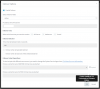
See attached...
How can we remove the failover configuration that was initially implemented during our trial when our license has since been downgraded to Standard which does not allow us to turn off the failover configuration?
Thanks
So I have a 3CX deployment that I configured with failover during my evaluation period.. I ultimately decided to stick with the Standard license for now which does not include the failover option -- this is fine.
However, a failover event just occurred and my 3CX FQDN is now binding to the failover server and I have no way to revert our 3CX FQDN back to the Active server since we are now running a Standard license.
See attached...
How can we remove the failover configuration that was initially implemented during our trial when our license has since been downgraded to Standard which does not allow us to turn off the failover configuration?
Thanks