3CX firewall problems behind Airport Extreme

Status
Not open for further replies.

leosa

Joined
Nov 7, 2008
Messages
19
Reaction score
0
Hi guys,

Everything was fine until on the last days I’ve been noticing some audio interruptions on phone system.
I did the Firewall Test an it failed. The messages were Warning (8) and Error (10) on ports 9000-15 and Error (4) between 9012-15.

A Re-read and re-applied a couple of times the settings described in https://www.3cx.com/blog/voip-howto/linksys-router-configuration/ - new link and the problem persists. My router is an “Airport Extreme with 802.11n” with version 7.3.2.
Its setting are reproduced below:

- Enable NAT Port Mapping Protocol – checked;

Port Mappings:
- VoIP-RTP
Public UDP 9000-9015
Private IP Addr: 10.0.1.198
Private UDP 9000-9015

- VoIP-SIP
Public UDP 5060
Public TCP Ports 5060
Private IP Addr: 10.0.1.198
Private UDP 5060
Private TCP Ports 5060

-VoIP Tunnel
Public TCP Ports 5090
Private IP Addr: 10.0.1.198
Private TCP Ports 5090

Is there anything im missing?
Thanks for your help!

Leo
 
Last edited by a moderator:
Hello,

Any idea about the problem described? Any mac user running 3CX behind an Airport?

An extra information: The firewall test alternates between "Failed" and Passed with warnings" (in this case without Error (4)).

Thanks again,
Leo
 
If your firewall tests fail or pass with warnings, you are going to have problems with one way audio. See this nugget for an overview:

http://www.3cx.com/docs/ - updated link

Use the tunnel, or else you are going to have to get more understanding how your firewall works and how you can do STATIC port forwarding.
 
Hi Nick,

Thanks fo your attention and sorry for delay on reply (notify checked now).

I watched your presentation and understood that without static port mapping the conection goes through one port and than loses the port to return. As you suggested on nugget, I tryed to adapt the provided guides for Linksys an Cisco to my Airport configuration.

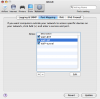
I created static rules for RTP (9000-9015/UDP), SIP (5060/UDP and TCP) and tunnel (5090/TCP). Im sending and attached picture.

Is there any other thing I should check?

Thanks again and regards,
Leo
 

Attachments

  • Picture 2.png
    Picture 2.png
    69.1 KB · Views: 3,925
Hello Nick, All,

Im still having problems with Airport and would like to share some new moves.

I tried what was suggested on this forum http://forums.hostrocket.com/showthread.php?t=20727 by MarkyD: Assigned the IP from PBX box (10.0.1.198 in my case) as a default host on Airport, hoping that it would be put on a DMZ and work without port number changes.

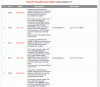
Unfortunatelly this didnt solved the firewall problems (screenshot attached) and the telephone still has audio problems both on calls from/to PSTN and VoIP.

Any suggestions?

Thanks in advance,
Leo
 

Attachments

  • firewall-failed.gif
    firewall-failed.gif
    41.1 KB · Views: 3,875
If you are still having warnings then quite simply your firewall configuration is not correct. Try using a linksys (which is different from what you are using) and then follow the guide.
 
If you are using an external extension, i suggest using the tunnel....
 
admin said:
If you are still having warnings then quite simply your firewall configuration is not correct. Try using a linksys (which is different from what you are using) and then follow the guide.

Hi Nick,

Thanks for replying.

Unfortunatelly I can't substitute the Airport for a Linksys. And im not using a firewall, the whole problem is due to NAT translation at apple router. Im not using a tunnel, too. All extensions are local.

I will keep trying an write back to report how I solved this.

Thanks again,
Leo
 
I'm having the same issue running an Aastra 9143i behind an Airport Extreme.

I reserved an internal DHCP-issued IP address (by MAC address of the phone) to give it a static internal IP that I can map the necessary ports to and that allowed me to register the extension/make calls, but I can't hear anything from the other end or receive calls at my extension. I suspect it is an issue with NAT since I only get one way communication.

I am using AT&T U-verse and the gateway device is acting as a bridge. All my other NAT-based devices are working fine. I even have another SIPURA VoIP adapter connected to an Asterisk server that works perfectly as a remote extension without any static port mappings.

Did anyone figure this out yet? :roll:
 
Status
Not open for further replies.

Latest Posts

Forum statistics

Threads
111,883
Messages
589,537
Members
164,741
Latest member
Carsonix