- Joined
- Jan 30, 2025
- Messages
- 4
- Reaction score
- 0
I have not been able to get our 3cx outbound calls to display our registered CNAM to recipients. I have been in contact with Flowroute and getting some helpful feedback.
1. Is there a way to capture network traffic with a hosted 3cx Free SMB instance?
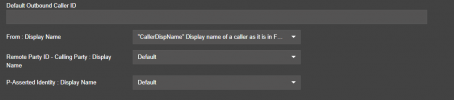
2.Is there any documentation on how the Trunk,Options,Caller ID Control drop down menu items relate to SIP invites. Also the drop down menus truncate the description and hovering over them does not reveal.
3. Better yet, is CNAM/Caller ID working for anyone using 3cx Free SMB and Flowroute? I just want the recipient to see: 1234567890 and Company Name
4. Lastly there was one comment from flowroute that we are passing "anonymous" to flowroute which will then ignore the sent names. Remote-Party-ID: "XXXX,XXXXX"<sip:[email protected]:5060>;party=calling . What is adding the "anonymous" and how do I fix that?
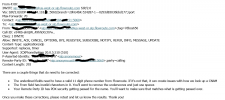
This is example of feedback from flowroute attached.
1. Is there a way to capture network traffic with a hosted 3cx Free SMB instance?
2.Is there any documentation on how the Trunk,Options,Caller ID Control drop down menu items relate to SIP invites. Also the drop down menus truncate the description and hovering over them does not reveal.
3. Better yet, is CNAM/Caller ID working for anyone using 3cx Free SMB and Flowroute? I just want the recipient to see: 1234567890 and Company Name
4. Lastly there was one comment from flowroute that we are passing "anonymous" to flowroute which will then ignore the sent names. Remote-Party-ID: "XXXX,XXXXX"<sip:[email protected]:5060>;party=calling . What is adding the "anonymous" and how do I fix that?
This is example of feedback from flowroute attached.